Troubleshooting & Analysis
I didn't believe a $20 pack of brush heads could be fine either
Here's where I started: dead certain the cheap ones were junk. I'd been buying genuine Oral-B Precision Clean heads for years — paying that $40-ish per four-pack like it was a tax I couldn't argue with — and every time I saw the compatible packs for a fraction of that, I assumed there was a catch. Worse bristles. A shaft that wouldn't seat. Something that'd wreck my handle or, I don't know, fall apart in my mouth in week two. So I kept paying. For a long time.
Then a four-pack of OEM heads ran out the same week money was tight, and I bought a compatible set almost out of spite — fully expecting to write a "told you so" review. I've now had them in rotation in my bathroom for about five months. This is that review, and it did not go the way I planned.
The price gap is genuinely stupid
Let's do the actual math, because that's the whole reason you're reading this. Genuine Oral-B Precision Clean heads, depending where you shop, land around $9-10 a head when you buy the small packs — call it $40 for a four-pack. The compatible set I grabbed was right around $20 for a pack that lasts a full year if you swap every three months like you're supposed to. So a year's worth of replacement heads for less than what two original ones cost me. I read that on the listing and rolled my eyes — sounded like marketing. It's just true, though. I've now bought two rounds of them.
That's not a "few dollars cheaper." That's the difference between replacing heads on schedule and stretching a frayed one for six months because you don't want to spend the money — which, if you've ever done it, you know is the actual reason most people brush with a busted head.
Do they actually fit the handle?
This was my first worry, because a brush head that wobbles is worthless. The swap is exactly what you'd expect: pull the old head straight off the metal shaft, rinse the shaft under warm water (mine had a little gunk ring at the base — do this), and push the new one on until it clicks. And it does click. First time, both my handles — an older one and a newer rechargeable — the head seated with that same little snap the originals give you. No play, no rattle when the motor spins up.
I'll be honest about the one fit thing I noticed: on the very first install, one head went on a touch stiffer than the OEM does, like the inner collar was a hair tight. It clicked fine, it just took a firmer push. By the second swap it was a non-issue — either I knew what to expect or the tolerance loosened slightly. Not a dealbreaker. But it's the kind of small thing the listing won't tell you and I would've wanted to know.
How they actually clean
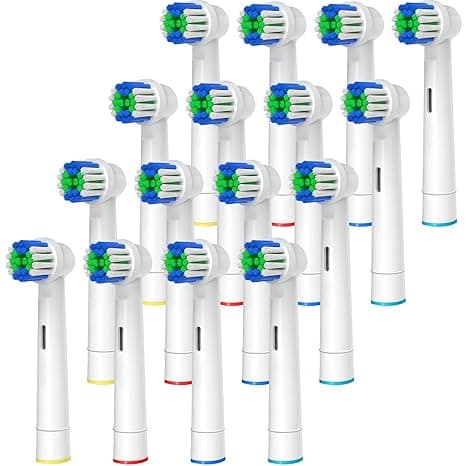
The bristles are DuPont — same material the originals use — and after five months I can tell you my teeth feel exactly as clean coming off these as off the genuine heads. That squeaky, just-left-the-dentist feeling along the gumline? It's there. The bristle pattern on the Precision Clean is that round cup shape that hugs one tooth at a time, and these copy it closely enough that I genuinely can't feel a difference in the clean.
Where they're a touch behind: the indicator bristles — the blue ones that fade to signal it's time to replace — fade a little faster and a little less evenly than the originals. On the OEM heads the color is a pretty reliable three-month clock. On these, a couple of them looked half-faded by month two even though the bristles were still doing their job fine. So I stopped trusting the color and just set a calendar reminder. Mild annoyance, not a flaw in the cleaning.
The real downsides — and there are a couple
I said I'd be straight with you, so. First: the packaging is cheap. The originals come in that rigid sealed blister; these showed up in thinner plastic, two heads sharing a flimsier tray. Doesn't affect the product, but it's the first thing that makes you go "yeah, this is the budget option." If unboxing matters to you, manage your expectations.
Second, and this is the one to actually weigh: there's a faint plastic smell the first day or two. Not chemical-harsh, just that new-plastic thing, and it's gone after a couple of rinses and brushings. I rinsed each new head under hot water before the first use and that knocked most of it out. By day three I couldn't detect it at all. But the first morning, yeah, I noticed it, and if I'm writing an honest review I'm not going to pretend I didn't.
Third, smaller: the bristles on one head splayed a little earlier than I'd like — around the ten-week mark instead of holding firm to twelve. The others held fine. Quality is a hair less consistent head-to-head than OEM, where every single one is identical. With a year's supply for $20 I genuinely do not care, but consistency is the thing you give up at this price, and you should know that going in.
Why a worn head is the part that actually matters
Here's the thing that flipped my thinking. The danger with a toothbrush head isn't really the brand on the package — it's letting a frayed one stay in service. Bent, splayed bristles stop reaching the gumline and stop lifting plaque, and an old head that's been damp in a bathroom for months is sitting on a real load of bacteria. My dentist has griped at me about exactly this. The whole point of replacing on schedule is to never brush with a dead head. And the brutal truth is that when each head costs $9, people don't replace on schedule — they stretch it. At five bucks a head, I actually swap them when I'm supposed to. The cheap head I'll replace beats the premium head I won't.
Who should skip these — and what I actually do
If you're someone who needs the indicator bristles to be a dead-accurate clock, or you've had a bad reaction to off-brand oral products before, or the slight first-day plastic smell would bug you enough to matter — buy the genuine Oral-B heads. No shame in it; they are a touch more consistent and the fade timing is more reliable. That's a fair reason to pay the premium.
For everyone else? I went in wanting to dunk on these and I've now bought them twice. Same DuPont bristles, the click is right, my teeth feel the same, and I replace them on time because they don't cost me $40 to do it. For roughly the price of two original heads I get a full year — and I'd rather brush with a fresh compatible head every three months than baby an expensive one until it's a frayed bacteria sponge. That's the verdict. I grab these now, and I'm not going back.



