Troubleshooting & Analysis
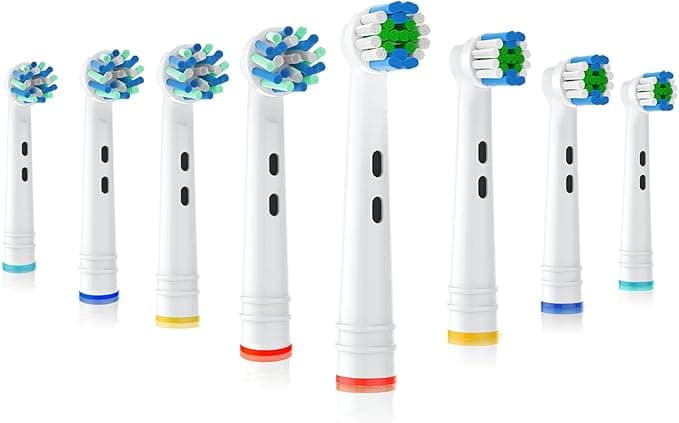
The click. That's the first thing I check now, every time, because the first compatible head I ever bought for my Oral-B didn't give me one. It just kind of… slid on and sat there, loose, wobbling a half-millimeter on the shaft. This CrossAction-style head was different. I pushed it down on the metal post and felt that small, definite snap up through my thumb — the same seat-and-lock my old genuine head had. Then I ran a finger over the bristles while they were dry and got that faint clean-plastic smell, the kind anything fresh out of a blister pack has. Three days later it was gone. But on day one, yeah, it's there.
I'm telling you about the click and the smell because those two things are exactly what you're nervous about, right? You own the handle. You've got a genuine Oral-B CrossAction head in one tab at maybe twelve, thirteen bucks a pop, and a four-pack of compatible heads in another tab for less than what two originals cost. And the little voice in your head goes: if it's that much cheaper, what's the catch — is it going to fall off mid-brush, scratch up my gums, or just be secretly junk?
The math that made me try them in the first place
Here's what got me. A genuine CrossAction head runs you roughly the price of two originals for what a compatible multi-pack covers across a whole year. Dentists tell you — correctly — to swap your brush head every three months. That's four heads a year, minimum. At OEM pricing you're handing over a real chunk of change annually just to keep clean bristles on a handle you already paid for. The compatible heads I've been buying get me that same year's supply for about the cost of two genuine heads. So we're talking a savings gap north of $20 every single year, on something you literally throw away every twelve weeks.
And that's what kept nagging me before I switched. You're not buying a precision medical instrument here. You're buying a stick with bristles on it that you replace four times a year. The bar for "good enough" is real — but it's not the moon.
Do they actually fit?
Mostly, yes — and the install is genuinely identical to the real thing. You pull the old head straight off the metal shaft (don't twist it, just a firm straight tug), rinse the shaft under warm water to clear the gunk that builds up at the base, and push the new head down until it clicks. That click is the whole ballgame. Get it, and you're fine. Once seated, the head should have almost no play side to side.
I'll be honest about the fit, though, because this is where compatible heads earn their lower price. The tolerances aren't quite as tight as the genuine article. On a couple of heads out of a pack, the collar at the base sat a hair looser than a true Oral-B head — not loose enough to wobble or fly off, but enough that if you went looking for it, you'd notice the gap. It never affected the brushing. It never came off in my mouth. But I'd be lying if I said it felt machined to the exact same spec.
How they actually clean
This is where I expected to get burned and didn't. The good packs use DuPont bristles — same supplier a lot of the name-brand stuff leans on — and on the device, the cleaning feel is honestly hard to tell apart. The oscillating motion lives in the handle, not the head, so as long as the head couples properly to that shaft and spins true, you get the same scrub. My teeth had that same dentist-clean squeak after a session. The angled CrossAction bristle pattern does the same job of reaching the gumline at a slant.
Where they fall a touch behind: bristle longevity. The indicator bristles — the ones that fade color to tell you it's time — faded a little faster on the compatible heads, and the bristle splay (that flaring-out you get with age) showed up maybe a couple weeks sooner than I remember from genuine heads. So if you're the type who pushes a head five or six months past its expiration anyway, you might notice the cheaper ones tapping out closer to the real three-month mark. Which is when you're supposed to swap them. So I'm not even sure that counts as a knock.
The genuine downsides — at least one, like I promised
The packaging is cheap. Flimsy clamshell, no individual seals on some brands, a print job on the box that looks like it went through a fax machine. It doesn't inspire confidence when it lands on your doorstep, and I get why that makes people second-guess. The product inside was fine every time — but the unboxing feels like the dollar-store version of the experience.
Second, quality control is streakier than OEM. Out of the multi-packs I've gone through, the big majority were perfect, but I've hit the occasional head with a slightly looser collar or a bristle tuft that wasn't trimmed dead even. Not dangerous, not unusable — but with genuine heads I basically never saw it. You're trading a small amount of consistency for a big chunk of money. That's the actual deal here, plainly stated. Look, if every head in every pack were flawless, they'd charge OEM money for them.
Why none of this is something to gamble on
Quick reality check on why you replace these at all: a worn-out head with splayed, flattened bristles genuinely stops cleaning. The dentist warning isn't fluff — frayed bristles glide over plaque instead of dislodging it, and an old head that's been sitting damp for months turns into a little bacteria hotel. The whole point of going compatible is that it makes the right thing — swapping every three months — cheap enough that you'll actually do it, instead of nursing one sad, flattened head for half a year because replacements feel too pricey to use up.
So who should buy what
If you've got sensitive gums, a specific orthodontic setup, or you're just someone who wants zero variance and cares that the box feels premium, buy the genuine Oral-B heads. No shame in it — the consistency is real and you're paying for it.
But for me, on a normal set of teeth, brushing twice a day, swapping every three months like I'm supposed to? The compatible CrossAction heads do the same job with the same DuPont bristles for around twenty bucks a year less, and I've gone through enough packs now to trust them. Looser packaging, streakier QC, fine. The click is there, the clean is there, the price is way down. I reordered last month. That's the most honest review I can give you — I voted with my own wallet, twice.



