Troubleshooting & Analysis
Forty bucks for four toothbrush heads. Are you kidding me?
I was standing in the oral-care aisle holding a four-pack of genuine Oral-B brush heads, and the sticker said $39.99. Ten dollars. Per head. For a chunk of plastic and nylon I'm supposed to throw away every three months. I did the math right there: four replacements a year, and that's only if you're disciplined about swapping them. Most people stretch a head to five or six months because, well, ten bucks. So you end up brushing with a flattened, splayed-out brush for half the year just to feel okay about the price.
That's the trap. And it's exactly why I started buying compatible heads instead.
Here's the gap that pushed me over: a year's worth of these aftermarket heads costs me about what two original Oral-B heads cost. Two. I bought a pack that worked out to roughly $4 a head versus the $10 OEM is asking. Over a year — say you actually replace on schedule, four times — that's $16 of compatible heads against $40 of genuine. And honestly the real savings is bigger than that, because cheaper heads mean I actually swap them when I should instead of nursing a dead one.
So I bought the cheap ones. Here's what I expected to go wrong.
I assumed they'd be junk. Loose fit, bristles falling out by week two, that rattly wobble on the handle that tells you the molding is off. I've been burned by aftermarket stuff before, so I went in skeptical.
The install is the same as the original, which is the first reassuring thing. You pull the old head straight off — it just lifts off the metal shaft, no twisting. I rinse the shaft under warm water because gunk builds up down in there where the head meets the handle (do this, seriously, it's gross when you finally look). Then you push the new head on until it clicks. That click matters. On a good head you feel it seat and there's no play afterward. On a bad one it sort of slides on and sits there loose.
These clicked. Solid seat, no wobble when I ran it. I grabbed the head and tried to wiggle it side to side and it held tight to the shaft the same way the genuine one does. That was the moment I relaxed a little.
How they actually clean
This is the part people care about and won't say out loud: does the cheap head leave my teeth feeling clean, or am I trading $24 a year for a worse brush?
After a couple months of twice-daily use, the answer is they clean basically the same. The ones I buy use DuPont bristles — same supplier a lot of the name-brand heads use — so the feel against the teeth and gums is familiar. Same little tingle, same squeaky-clean front teeth after. The oscillating motion does the work; the head is just the delivery, and a round head with good nylon does that job whether it says Oral-B on the box or not.
Where I'll be straight with you: the bristles on my compatible heads start to splay a touch earlier than the genuine ones. Maybe by week ten instead of week twelve I can see the outer rows fanning out. But — and this is the whole point — at $4 a head I just swap it. The OEM head might hold its shape a couple weeks longer, but I was never going to pay $10 to replace it on time anyway. The cheaper head that I actually replace beats the expensive head I stretch to death.
The real downsides. I'm not going to pretend there aren't any.
First few days, there's a faint plastic-and-rubber smell when you first open the pack and run the head wet. It's the fresh molding off-gassing. It fades after two or three uses and I've never had it affect taste once it's broken in, but the first morning you'll notice it. The genuine heads have less of that out of the box.
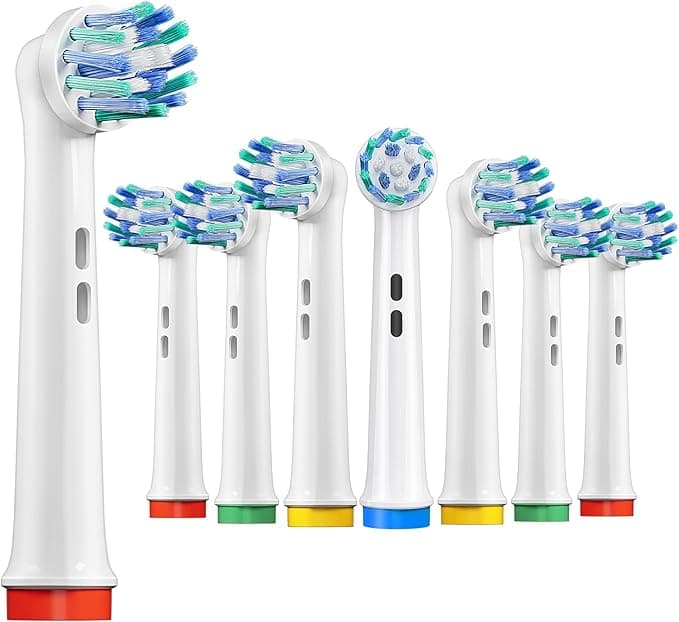
Second, the packaging is cheap. Thin plastic clamshell, sometimes the little colored indicator ring on the bristles isn't as crisp as the original. Cosmetic stuff. The indicator ring — the band of color that fades as the bristles wear so you know when to replace — does fade and tell you the truth, it just looks a hair less polished.
Third, and this is the honest one: quality control across batches isn't as locked-down as the brand. Out of the last couple dozen heads I've bought, I had one that the click felt slightly less positive than the rest. It still seated and worked fine the whole cycle, but it didn't have that confident snap. One out of two dozen. I can live with that at this price. If you can't live with any variance at all, that's a real reason to pay up for OEM, and I won't argue you out of it.
Why I don't mess around with a worn head — cheap or not
This isn't just thrift talk. A splayed, flattened brush head genuinely stops doing its job. The bristles are supposed to flex around the curve of the tooth and reach the gumline; once they fan out flat they skate over plaque instead of lifting it. Dentists will tell you a worn head is one of the quiet reasons people get plaque buildup despite "brushing twice a day." And the head itself collects bacteria over months — that warm, wet plastic sitting in your bathroom is not a clean object after twelve weeks. The rule is every three months, and the reason cheap heads are actually better for most people is that they make that rule painless to follow.
Who should still buy genuine — and who should grab these
If you've got sensitive gums and you've found one specific OEM head shape that your dentist recommended and your mouth is happy with, stick with it. If batch-to-batch consistency would drive you up a wall, pay for the brand and never think about it. That's a legitimate call.
But for me? I run an Oral-B handle every morning and night, I want my teeth clean, and I refuse to pay $10 for a part I throw away four times a year. The compatible heads use the same DuPont bristles, click on the same way, clean my teeth the same, and let me replace on schedule for the price of two genuine heads a year. Slightly earlier splay, a little break-in smell, cheaper box. That's the whole list of compromises.
I've bought them three times now. I'll buy them again next time the indicator ring fades. For the savings, doing the same job, that's an easy call — and my teeth haven't filed a complaint.



