Troubleshooting & Analysis
Forty dollars for four little plastic heads
That was the number that stopped me. I was standing in the toothbrush aisle holding a genuine Oral-B replacement pack — four brush heads, the official ones in the blue-and-white box — and the tag said almost $40. Ten bucks a head. For a thing I'm supposed to throw out every three months. Do that math forward a year and you're spending forty, fifty dollars annually just to keep bristles on the end of a handle you already paid for.
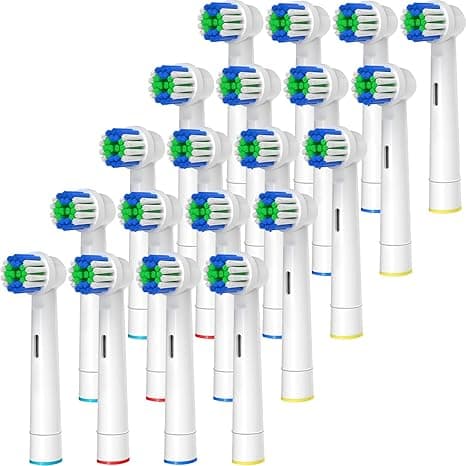
Right next to it, a compatible 8-pack. Twenty bucks. Eight heads. That's a full two years of brushing for half the price of one OEM four-pack. I'll be honest — my first thought was "yeah, and they'll fall apart or scratch my gums." So I bought a pack to find out, because I'm too stubborn to keep paying ten dollars a head on faith.
I've been running them ever since. Here's the actual story.
The price gap, spelled out
Genuine Oral-B heads land somewhere around $8 to $10 each depending on the model and whether there's a sale. The compatible packs I've been buying work out to roughly $2.50 a head — sometimes less if you catch a multipack deal. Over a year, brushing twice a day and swapping on schedule, that's the difference between spending about $40 and spending about $10. Same handle. Same routine. The savings basically pay for a nice dinner out, every single year, for doing nothing different.
And before you assume cheap means flimsy junk: the better compatible heads use DuPont bristles — the same nylon filament supplier the brand-name heads lean on. That was the detail that actually got me to try them. It's not some mystery fiber. It's the stuff the expensive ones are made of too.
Do they actually fit?
This was my real worry. An electric toothbrush head that's a hair off seats crooked, wobbles, and rattles every morning until you want to throw it across the bathroom.
The install is genuinely a five-second job, and it's identical to the originals. You pull the old head straight off the metal shaft — just a firm tug, no twisting. Rinse that shaft under warm water, because three months of toothpaste gunk builds up in there and you don't want to seal it under a new head. Then push the new one down until it clicks. That click matters. When you feel and hear it seat, you're done.
On every head I've used, the click happened right where it should and the fit was snug. No wobble, no rattle, no gap at the base. I'll give you the honest caveat though: out of a pack of eight, I had one head that sat just a touch looser than the rest — not enough to wobble in use, but I noticed it went on with a hair less resistance. It still worked fine for its full three months. Quality control across a cheap multipack isn't going to be flawless, and you should expect maybe one slightly-off head per pack. At $2.50 each, I genuinely do not care.
How they clean — the honest version
Day to day, my teeth feel exactly as clean as they did with the OEM heads. The post-cleaning slickness when you run your tongue across your teeth — it's there. The bristles oscillate the same, they reach the back molars the same, and after a dentist visit a couple months into using them, I got the usual "looks good, keep it up" with no new complaints. That's the bar for me.
Where the originals have a slight edge: bristle longevity. The genuine heads seem to hold their shape maybe a couple weeks longer before the bristles start splaying out. With the compatible ones, by week ten or eleven I can see the outer bristles fanning a little earlier than the OEM did. Here's the thing though — you're supposed to replace the head at three months anyway, splayed or not. Worn-out bristles stop lifting plaque properly and they're the whole reason for swapping on schedule. So the heads aging out right around when you're meant to toss them isn't really a knock. And since you've got eight of them instead of four, swapping a little early costs you nothing.
The downsides I won't pretend away
The packaging is cheap. Thin plastic clamshell, no individual wrapping on some brands, sometimes a print job that looks like it was done on a home printer. It feels less premium than the brand box, and if you're gifting an electric toothbrush this is not the head you wrap up.
There's also a faint plastic smell on the first one or two heads out of a fresh pack — that new-injection-molded-plastic note. It rinses off after the first day of use and I've never tasted it while brushing, but it's there when you open the bag. The originals don't really have it.
And the indicator bristles — those colored bristles that fade to signal "time to replace" — fade a little unevenly on the compatibles, so I stopped trusting them and just set a calendar reminder every three months instead. Honestly that's the better habit anyway. Don't rely on a color to tell you; a worn head is a bacteria trap, and old splayed bristles quietly stop doing their job long before you'd notice on your own.
Who should skip these
If you've got sensitive gums and your dentist specifically matched you to a particular OEM head — a gum-care or sensitive-specific design — stick with what they told you. The compatibles cover the common round and daily-clean styles well, but they don't perfectly replicate every specialty head, and your gums aren't the place to gamble ten bucks of savings. Same if the slight bristle-shape difference genuinely bothers you; some people can feel it and it drives them nuts.
The verdict
For everyone else — which is most of us — this is an easy call. Same DuPont bristles, the same click-on fit, cleaning my dentist signs off on, at roughly a quarter of the per-head price. The trade-offs are real but small: cheaper packaging, a day-one plastic smell, indicator bristles I ignore, and maybe one slightly-loose head per pack. None of that touches whether my teeth get clean.
I've reordered these twice now. At $2.50 a head against $10, with eight in a pack instead of four, I'd buy them again without a second thought — and I have. The forty-dollar box can stay on the shelf.



