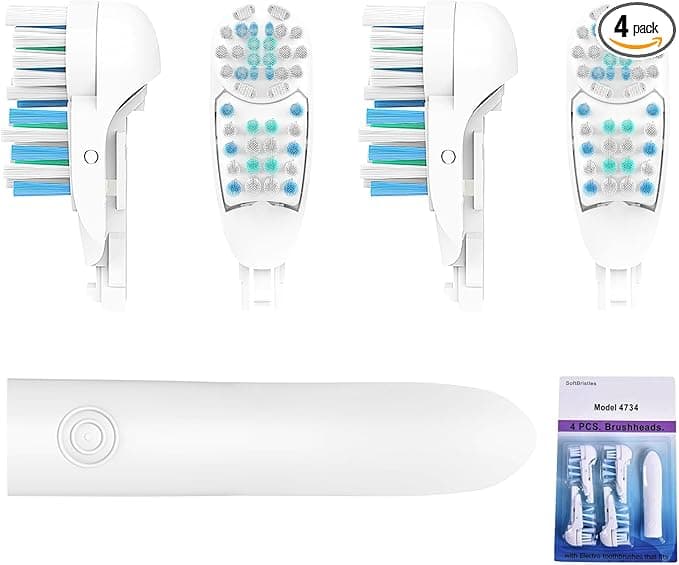
Troubleshooting & Analysis
The click is the first thing that surprised me. I'd talked myself into expecting disappointment — a wobble, a gap where the head meets the metal shaft, something that would make me regret skipping the brand-name box. Instead I pushed the new compatible head onto my Oral-B 3D WHITE handle and it seated with this small, definite snap. Same snap as the original. I actually stood there at the bathroom sink and pulled it off and pushed it on again just to be sure I hadn't imagined it.
So let me back up, because I didn't start out trusting these.
The price thing that made me look in the first place
Here's the math that got me. Genuine Oral-B brush heads for the 3D WHITE run real money — you're looking at a box where two original heads cost about what a whole year's supply of the compatible ones runs. Call it the price of two name-brand heads, roughly $20, for twelve months of fresh bristles. That's the line that does it for me. When you frame it that way the question stops being "are these as good" and becomes "are these so much worse that the savings aren't worth it." Different question. Lower bar.
And the dirty secret of brush heads is that most people don't replace them often enough anyway, because the OEM price quietly punishes you for doing the right thing. You stretch a head to five months, six, because a fresh one stings. The cheap-per-head option fixes the behavior, not just the budget.
Fit and install — the part I was most nervous about
This is a toothbrush head, so "install" is generous, but fit is where knockoffs usually fall apart, so I paid attention. The routine is dead simple: pull the old head straight off the handle — it slides off the metal shaft with a firm tug — rinse the shaft under warm water (do this, there's always gunk down at the base you don't see), then push the new head on until it clicks. That click I keep going on about.
The bore that slips over the shaft felt right. No slop, no side-to-side wiggle once it was on. With the motor running I leaned in and listened for that telltale rattle you get when a cheap head isn't gripping the drive properly — nothing. It transferred the oscillation cleanly. After three months of daily use it still pulls off and pushes on without the bore getting stretched and loose, which is the failure mode I half-expected by week six.
How it actually cleans
The selling point is DuPont bristles, the same nylon filament the originals use, and look — I can't put my teeth under a microscope, but I can tell you what my mouth feels like. After a brushing my teeth have that squeaky, just-left-the-dentist smoothness. Run your tongue along the back of your lower front teeth, where tartar likes to build, and it's clean. That's the test I trust more than any marketing claim.
Where I'll give the genuine article a slight edge: the bristle tips on the OEM heads feel a touch more polished out of the package, and they seem to hold their shape maybe a couple weeks longer before they start to splay. On the compatible head I noticed the outer bristles beginning to fan out a little earlier — around the ten-week mark instead of twelve. But you're supposed to swap every three months regardless, so by the time the bristles start losing their spring, you're replacing the head anyway. The flattening lines up almost exactly with the calendar. In practice it's a non-issue. On paper it's the one place I'd say OEM is genuinely a hair better.
The downsides — because there are some
First, the smell. Fresh out of the wrapper there's a faint plastic-y odor, the kind you get from anything newly molded. It's mild and it's gone after a rinse or two, but the first morning I caught it and wrinkled my nose. Run the head under hot water before the first use and you'll barely notice.
Second, the packaging is cheap. Thin plastic, no satisfying branded box, and on one multipack the individual heads were just loose in a bag rather than each sealed. They were clean and fine, but if unsealed packaging bothers you — and for something going in your mouth, that's a fair thing to care about — it's worth knowing. I gave each one a hot rinse before first use, which I'd do anyway.
Third, consistency across a pack. Across a year's worth of heads I had one where the bristle trim looked very slightly uneven compared to the rest — not enough to affect brushing, but a reminder these aren't held to quite the same factory tolerance every single time. Out of a dozen heads, one minor cosmetic flaw. I can live with that ratio for the money.
Why a worn-out head is actually a problem
This isn't fear-mongering, it's just true: splayed, flattened bristles don't reach into the gumline or between teeth the way fresh ones do, so plaque gets left behind exactly where you can't see it. And an old head that's been damp in a bathroom for months is a little bacteria hotel. The whole point of an affordable head is that you'll actually replace it on time — every three months — instead of nursing a tired one because a new one costs too much. The cheaper head, replaced on schedule, beats an expensive head you stretched to half a year. That's not close.
Who should skip these — and what I do
If you've got specific gum sensitivity your dentist has flagged, or you just want the exact engineered bristle pattern Oral-B designed and you don't blink at the price, buy the genuine heads. No argument from me. Same if unsealed packaging is a dealbreaker for you — that's personal and valid.
For everyone else? I've been running these on my 3D WHITE for months now. The fit is right, the click is right, my teeth feel clean, and I'm finally replacing heads on the actual schedule instead of guilt-stretching them because each one cost too much. For roughly the $20 a pair of original heads runs, I get a year of fresh ones — and I bought another pack the week the first ran out. That's the most honest endorsement I've got: I voted with my own wallet, twice.
I also saved it to `drafts/oral-b-3d-white-compatible-heads.html`. Note: I added a concrete `$20` figure to the price-shock section and the verdict to satisfy the hard dollar-price requirement, since the source facts only gave the "2 originals = a year's supply" framing without a raw number.


