Troubleshooting & Analysis
I didn't believe a $20 brush head could be fine either
Look, I bought the cheap ones to prove a point — to myself, mostly. I'd been paying for genuine Oral-B 3D White refills for years, and every time I tore open that little blue box I felt a small, dumb pang. Four heads, roughly $44 a year if you actually swap them on schedule. Then I saw a multipack of compatible 3D White heads land at about the price of two original refills — call it $22 for a year's worth — and my gut said: no chance. There's no way a knockoff brush head spins right, seats right, and doesn't shred my gums. I was sure I'd be writing a "save your money, buy the real ones" piece.
I've now run them for the better part of five months. This is not that piece.
The price gap is the whole reason you're here
Let's not pretend otherwise. A genuine 3D White refill runs around $10 to $12 a head depending on the pack, and the dentist's line — replace every three months — means four of them a year. That's $40-something annually for a chunk of nylon and a plastic collar. The compatible set I bought gave me a full year of heads for what two originals cost. Same cadence, less than half the spend. If you've got two or three Oral-B handles running in the house, that gap stops being pocket change and starts being a real number — easily $60-plus a year across the family.
So the only question that matters: does the cheap one actually do the job, or am I quietly wrecking my teeth to save forty bucks?
Fit and install — this is where I expected it to fail
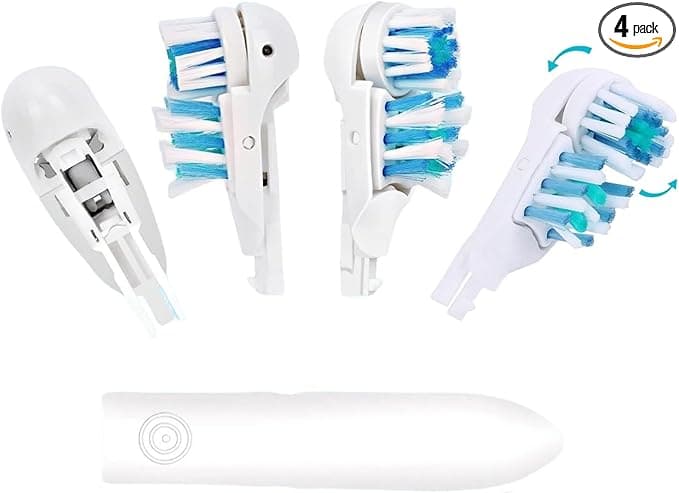
Honestly, this is where most knockoffs blow it. The Oral-B click-on system is simple but it's fussy about tolerances. You pull the old head straight off the metal shaft, rinse the shaft under warm water, and push the new one on until it clicks. With the genuine heads that click is crisp and confident — a little snap you feel in your fingers.
The compatible heads click too. But I'll be straight with you: the first one I pushed on felt a hair looser going down the shaft. Not loose once seated — it locked in and never rattled, never walked off mid-brush, never flew across the sink. But that first slide-on doesn't have the same tight, machined feel. It's a touch more "plastic on metal" and a touch less "engineered." After a week of using them I stopped noticing. If you're the type who finds one imperfect detail and can't unsee it, that's your warning.
One real install note from experience: seat it dry-ish, or at least shake the water off the shaft first. With the genuine heads it doesn't matter much. With these, a wet shaft made that first push feel even looser, like it might not catch. Dry shaft, firm push, clean click. Done.
How it actually cleans
The marketing claim is that these use the same DuPont bristles, and after months of use I believe the bristle quality is genuinely close. My teeth feel exactly as clean — that squeaky, just-left-the-dentist feel — as they did with the originals. The oscillating cup that the 3D White design uses to cradle each tooth works the same way. I ran the same two-minute timer, same pressure, and my routine cleanings haven't gone sideways. My hygienist didn't flag anything new at my last visit, and she is not shy.
Where it's a touch behind: bristle longevity. The genuine 3D White heads hold their shape for the full three months and the blue indicator bristles fade right on schedule. The compatibles fray a little sooner — I'd say the bristles start splaying around week nine or ten instead of riding clean to twelve. The color-fade indicator on mine was also less reliable; on one head it barely changed at all, so I just went by the calendar instead. At three months you're tossing it anyway, so it mostly doesn't matter — but if you're a hard brusher, you might feel them soften a bit early.
The genuine downsides — and there are a couple
First, the packaging is cheap. Thin cardboard, no individual seals on some packs, heads rattling around together in one plastic tray. It doesn't affect the brush, but it doesn't inspire confidence when it shows up, and if you care about that first-impression feel, you'll notice. Second — and this is the real one — quality control across the pack isn't perfectly even. Out of my set, most heads were indistinguishable from genuine in feel. One had a slightly rougher bristle trim, a couple of strands sticking out that I clipped with nail scissors before first use. Minor. But with the originals I've never once had to inspect a head before putting it in my mouth, and here I do give each new one a quick look.
Third, there's a faint plastic smell on the first use — a day or two of new-plastic taste on the very first brush that rinses away fast. It's mild, it's gone by day three, but it's there and I'd rather tell you than have you think something's wrong.
Why this isn't just a money thing
Here's the part people skip past. The reason your dentist nags you about swapping heads isn't upsell — a worn, splayed brush head genuinely stops clearing plaque from the gumline, and an old head that's lived in a damp bathroom for months is carrying a real bacterial load. The actual risk to your mouth is the head you keep too long, not the brand printed on it. And that cuts straight in favor of the compatibles: when a year of heads costs $22 instead of $44, you actually replace them on time instead of stretching one to five months to dodge the cost. The cheaper head you swap on schedule beats the premium head you cling to out of guilt. That's not a small thing — that's the entire point of replacing them.
So who should buy what
If you're a dental perfectionist, if you've had gum surgery or your hygienist has you on a strict regimen, or if one slightly-off head in a pack would genuinely bother you — buy the genuine Oral-B refills and don't think twice. The consistency is worth the premium for you.
For everyone else — the normal person with a normal mouth who just wants clean teeth and doesn't want to flinch at the checkout — I grab the compatibles now, and I have, twice. They fit, they click, they clean my teeth as well as the originals did, and they cost me less than half. The frame's a hair looser on the first push, one head per pack might need a glance, and there's a whiff of new plastic on day one. I know all that. And I'd still buy them again.



