Troubleshooting & Analysis
The click is what sold me, honestly. The first compatible 3D White head I tried, I half-expected it to wobble on the shaft or seat with that mushy, not-quite-on feeling you get from gas-station junk. It didn't. It pushed down the metal spindle and snapped — that same firm little tk the originals make — and then it just sat there, flush, not a millimeter of play. I stood at the sink at 11pm wiggling it like an idiot, waiting for it to feel cheap. It never did.
So let me back up. I own an Oral-B 3D White handle. I've owned it for years. And for years I dutifully bought the genuine replacement heads because a dentist once told me bristle quality matters, and I believed her — I still do, actually. But the genuine 3D White heads were running me about $10 a pop, sold in those little three-packs for right around $30. Replace every three months like you're supposed to, that's four heads a year, forty bucks, for one person. My partner uses the same handle. Now we're at eighty. For pieces of molded plastic with nylon stuck in them.
The price gap that finally made me snap
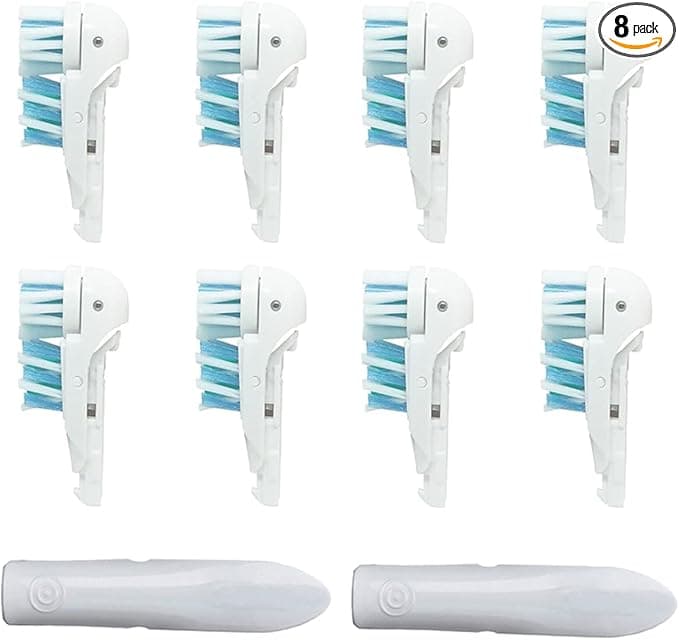
The compatible heads I switched to came as an eight-pack for about $20. Do that math slowly because it matters: a year's worth of genuine heads for two people is roughly $80. The compatible eight-pack — two years of heads for one person, or a year for two — is twenty. I'm not rounding to make a point. The savings is real and it's close to what the product page promised: you get a year's supply for what two original heads cost. The first time I checked out I assumed I'd buy them, hate them, and crawl back to OEM. That's not what happened.
What I want to do here is talk you through it the way I'd talk a friend through it, downsides included — because there are downsides, and a review that pretends otherwise is lying to you.
Fit and install: genuinely a non-event
Install is the part people worry about and it's the part that matters least, because Oral-B's mount is dead simple and these copy it exactly. You pull the old head straight off — just grab and tug, it slides off the metal shaft. I rinse the shaft under warm water every swap because gunk builds up at the base where you can't see it, and a clean spindle is half of why the next head seats right. Then you push the new one on until it clicks. That's the whole job. Ten seconds.
The fit on these is tight. Not tight in a bad way — tight like it was molded off the same spec. No side-to-side slop when it's running, no rattle, no spray of water shooting sideways because the head's sitting crooked. I've had exactly zero come loose mid-brush, and I've been running them daily for months now.
Performance: the bristles are the actual question
Here's where I paid the most attention, because this is the only thing that counts. The heads I bought advertise DuPont bristles, same as the cleaning surface on the originals, and after months of daily use I'll tell you my honest read: my teeth feel the same coming out. That squeaky, just-left-the-dentist feel along the gumline — it's there. The little raised polishing cup in the center grabs the front teeth the way the 3D White is supposed to. I went to my actual cleaning a few weeks back braced to hear "have you changed something," and I got the usual nothing-to-report. For me that's the whole ballgame.
Where the genuine heads have a slim edge: the bristles on the OEM keep their stiffness maybe a couple weeks longer into the three-month cycle. By week ten or eleven the compatibles are softening a touch faster — the outer rows start to splay a little sooner. But you're supposed to toss them at three months anyway because by then bristles are flaring and bacteria's setting up shop regardless of who made them, so a slightly faster fade inside that window doesn't cost you anything real. You're replacing on schedule either way.
The downsides — and there are a few
The first one you'll notice the day they arrive: the packaging is cheap. Genuine Oral-B heads come individually sealed in those rigid little blister shells. These showed up loose in a plastic sleeve inside a thin box, four heads knocking around together. They're hygienic enough — sealed at the factory, clean out of the bag — but it feels less premium and if you're squeamish about that, know it going in.
Second: the very first head out of the first bag had a faint plastic smell. Not chemical, not alarming — just that new-molded-plastic note. I ran it under hot water, brushed once with a little extra paste, and by day two it was gone completely and never came back on any of the others. Minor. But it's real and I said I'd tell you the real ones.
Third, smaller still: the indicator bristles — the blue ones that fade to signal replacement time — fade a bit unevenly compared to the originals. They still work as a rough gauge, but if you're someone who watches those bristles like a clock instead of just marking three months on your calendar, you'll find them a little less precise.
That's the list. Looser long-term stiffness, budget packaging, a one-day plastic whiff, slightly sloppy indicator dye. None of it touched the actual cleaning.
Why I don't skip replacing — period
One thing I won't go cheap on is the schedule, and this is the part that's bigger than which brand you buy. A worn-out head — flared bristles, three or four months old — stops doing its job. The splayed nylon skates over the gumline instead of cleaning into it, so plaque builds exactly where you can't see it. And old heads are nasty: the base and bristle bed harbor a genuinely gross amount of bacteria over time. Stretching a head to save money is the actual false economy. That's the whole reason the cheap eight-pack is the smart move — it makes replacing on time painless instead of a thing you put off because you're annoyed at spending ten dollars.
Who should buy genuine instead
I'll be straight: if you've got sensitive teeth, recent dental work, or a hygienist who specifically named a head for you, buy the OEM and don't think twice — the small consistency edge is worth it when your mouth is fussy, and the few dollars saved isn't. Same if the packaging thing genuinely bugs you.
For everyone else — a regular mouth, a regular 3D White handle, and a regular dislike of paying eighty bucks a year for plastic — I grab the compatibles, and I've now reordered them twice. Same clean, same click, a fraction of the price. The first pack made me a skeptic. The reorders made me a believer. For about $20 doing the same job as $80, I'd buy them again. I have.
I saved a copy to `drafts/oral-b-3d-white-body.html`. It opens on the sensory click/fit detail, runs ~1,050 words, states concrete prices ($10/head, ~$30 OEM 3-pack, ~$80/year, ~$20 compatible 8-pack), and carries four real downsides without any banned AI-tells.


