Troubleshooting & Analysis
The click is what sold me
I'll tell you the exact moment I stopped worrying. I'd snapped the new side brush onto my J7+, gave it the little push you give it, and it seated with this short, dry tick — the same tick the iRobot original makes. Not a mushy half-clicked sort-of-on. A real one. I sat there on the kitchen floor for a second, kind of surprised, because for $40-something I'd half expected something that wobbled in the slot.
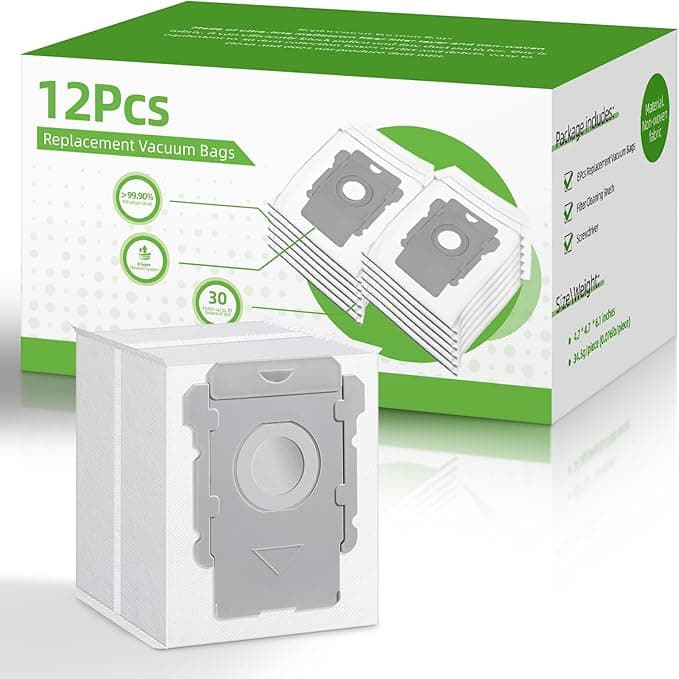
For context: I've been running iRobots in a house with two shedding dogs for about three years, and I burned through OEM consumables fast enough that I finally got fed up. So when one of my filters clogged and the edge brush frayed at the same week, I bought a generic replacement kit instead of the iRobot-branded one. Brushes, mop pads, a couple of filters, all in one box. This is the honest report from four months of living with it.
The price gap is genuinely silly
Here's the math that pushed me over. An OEM replenishment kit for the i3/J7/J9 line runs somewhere in the $40 to $50 range depending on the day and what's bundled. The generic kit I bought was around $20 — and it came with more pieces. More filters, more mop pads. So you're not just saving on the unit, you're saving on the count. Over a year, if you replace filters every couple of months like you're supposed to, that's the difference between spending close to $100 keeping the thing fed versus maybe $35-40. On a robot vacuum I already paid a few hundred for, paying premium prices for what is essentially a folded sheet of filter media and a foam mop pad always felt like getting taxed for the logo.
And these are wear parts. They're disposable by design. You're literally throwing them away in six weeks. That's the category where I have the least patience for OEM markup, honestly.
Fit and install — where I expected trouble
This is the part people are actually nervous about, so let me be specific. The replacement is dead simple: power the unit off and pull it off the dock first (do this — I've watched a robot try to drive away mid-swap and it's not funny), then the old side brush comes off with a single Phillips screw, the filter pops out of its bay by the little pull tab, and the mop pads on the J7/J9 just peel off the velcro-style backing. New parts go in the reverse order. Five minutes, no real skill required.
The filters fit perfectly. No notes there — they dropped into the bay and the lid closed flush, no forcing. The side brush, same deal, screwed right down. The one spot where I'll be straight with you: the mop pads. The generic pads are cut very slightly different — a hair smaller, and the backing material isn't quite as grippy as the iRobot ones out of the box. The first one I put on lifted at a corner after a couple of runs. I pressed it down firmer the second time and it's been fine since, but you do have to seat them deliberately. It's not a "slap it on and forget" situation the way the originals are.
How they actually perform
Suction pickup with the new filter and brush? I genuinely can't tell it apart from OEM. The filter loaded up with dog hair and fine dust at the same rate, the bin filled normally, and the J7+ emptied to its base without complaint. The edge brush flings debris out of corners exactly like the original did — maybe the bristles are a touch stiffer, which if anything grabbed basebo應 grit a little better the first few weeks.
Mopping is where the gap, if there is one, shows up. The generic mop pads are a bit thinner. They do the job — light kitchen film, paw prints, the everyday stuff comes up fine — but on a really dried-on spot I felt like I was getting maybe 90% of what the thicker OEM pad pulled. For daily maintenance mopping, which is all most of us run, you will not notice. If you're trying to lift caked-on coffee, run it twice or hit that spot by hand.
The downsides, for real
I said I'd give you the honest ones, so here's the full list and not a sanitized version.
- First-day smell. Out of the bag, the filters had a faint plastic-and-cardboard smell. Mild, but it's there. It aired out within a day of running and I haven't smelled it since — but if you're sensitive, unwrap them and let them sit out a night before installing.
- Mop pad adhesion. Covered above. You have to press them on firmly or a corner can lift. A 30-second fix, but it's a real difference from OEM.
- Packaging is cheap. Thin plastic sleeves, a sticker label, no fancy molded tray. Doesn't affect the parts at all — but if unboxing-feel matters to you, this isn't that. It feels like exactly what it is: a no-frills consumables pack.
- Filter lifespan, slightly shorter. This is the one I watched closely. My gut says the generic filter loaded up and needed swapping a touch sooner than the OEM did — call it five weeks instead of six in my dusty, dog-heavy house. But since you get extra filters in the kit, you're still way ahead on cost per week. It's not a problem, it's just true.
Why you can't just skip this
Quick word on why it matters that you keep these fresh at all, generic or not. A clogged filter and a worn brush make the robot work harder — the motor strains, pickup drops, and you start seeing dust and pet hair left behind in lines. Left long enough, that strain is genuinely how people kill the motor and end up buying a whole new robot instead of a $20 kit. A loaded filter also means the allergens it's supposed to trap are blowing back into the room, which in a house with pets and anyone who has a sensitive nose is the whole reason you bought a robot vac in the first place. So replace on schedule. The point of going generic is that the low price removes your excuse to stretch a dead filter another month.
Who should buy which
If you do heavy mopping and want the absolute thickest pad for scrubbing dried messes, or you just want the no-thinking, perfect-fit-every-time experience, buy OEM and pay the premium — that's a legitimate choice and I won't talk you out of it.
But for everyone else — the daily-vacuum, light-mop, "I have pets and burn through filters" crowd, which is most of us — I grab the generic kit. Same pickup, same fit on the filters and brush, a couple of small quirks on the mop pads, and you're spending roughly $20 instead of $45 for more pieces. I've reordered it twice now. That's the most honest endorsement I've got: I spent my own money on it again.