Troubleshooting & Analysis
Sixty-five dollars. For ink.
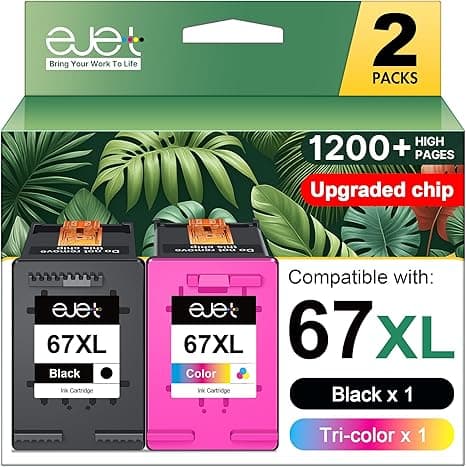
That was the number that made me put the cart down at the store and pull out my phone. Two genuine HP 67XL cartridges — one black, one color — rang up north of $65 for my little 2722E. The printer itself cost me fifty-something on sale. I was about to spend more on a refill than I paid for the machine. That's the moment most people start Googling, and it's exactly the moment I started buying compatible.
So here's the honest version, from someone who's now run third-party 67XL cartridges through this printer for the better part of a year. Not a sponsored take. Just what actually happened.
The math that made me switch
The OEM high-yield 67XL combo runs around $60–65 depending on the week. The compatible version I've been buying lands at roughly half that — call it $30 or so for the pair, sometimes less when there's a multipack deal. That's a $30-plus gap every single refill cycle.
I print maybe two or three times a week — kid's homework, a return label, the occasional photo my mom wants on the fridge. At that rate I go through a set every few months. Run the numbers over a year and the OEM habit was costing me somewhere around $130–180 in ink alone. The compatible route cut that close to in half. Over the life of a cheap printer, the ink is the actual product. HP basically gives you the hardware to sell you the cartridges, and once you see that, $65 a refill stops feeling normal.
Does it actually fit and click?
This was my first worry. A cartridge that doesn't seat right is worse than no cartridge — it'll throw errors and waste a print head's worth of patience. So the first time, I went slow.
You lift the cover, wait for the carriage to slide over and stop on its own — don't force it. Press the little tab to pop the old one out. The new compatible cartridge comes with the protective tape over the contacts and nozzles; you peel that off completely (I almost missed a corner of it the first time, which would've been a mess), then push it down into the slot until you feel and hear the click. Then a test print.
And it clicked. Same click as the genuine one — that solid little seat where you know it's home. Fit was dead-on. No wiggling, no shimming, no praying. Honestly the install was identical to the HP cartridge, which is the whole point.
How it prints — the honest comparison
Text? I genuinely cannot tell the difference. Black documents come out crisp, dark, no faded streaks, no banding. For homework and shipping labels and the stuff that's 90% of why this printer exists, the compatible cartridge does the exact same job.
Color is where I'll be straight with you. On a plain document — colored charts, a flyer, a coupon — it's fine, vibrant enough that nobody would ever question it. On a glossy 4x6 photo, side by side with an OEM print, the compatible one is a hair less punchy in the deep skin tones. We're talking a difference I only see because I went looking for it, holding two prints under a lamp. If you're printing gallery photos, buy OEM for those. For everything else, you will never notice.
The downsides — because there always are some
Let me earn your trust here instead of pretending it's flawless.
First: the low-ink warnings get weird. HP's software is designed to recognize HP cartridges, so with a compatible one you'll sometimes get a "non-genuine cartridge" pop-up, and the ink-level gauge can be unreliable or just show a question mark. You learn to ignore the level meter and go by results — when prints start fading, swap it. That's a real annoyance, not a dealbreaker, but you should know it's coming so it doesn't scare you the first time.
Second: consistency between batches isn't quite as locked-down as OEM. Out of the maybe six or seven sets I've bought, one black cartridge primed a little slowly — the first two test pages came out light before it fully woke up and ran perfectly after. A couple of cleaning-cycle passes sorted it. Annoying for thirty seconds, then forgotten. With genuine HP I've never had that, so it's a fair knock.
Third: the packaging is cheap and forgettable. Thin plastic clamshell, a little plastic smell when you first open it, no fancy box. It does not feel premium. But I'm not framing the box — I'm printing my kid's book report, so I genuinely do not care.
Why running dry actually matters
One thing the cheap route gets right that pays off: I keep a spare set in the drawer now. At $30 a pair, stocking a backup doesn't sting. Back when a refill was $65, I'd let the printer run bone-dry and then scramble — there is nothing worse than a "low ink" warning at 11pm the night before something's due, and the store's closed. Cheaper ink means I'm never in that spot. A printer you can't trust to fire when you need it isn't saving you anything, and the price gap is the thing that finally let me stop rationing prints like they were precious.
So who should still buy OEM?
If you print high-end photos for a living or to sell, or you need HP's warranty and software to behave perfectly with zero pop-ups, pay the $65 and sleep easy. That's a legitimate reason and I won't talk you out of it.
But if you're like me — a 2722E or 6412 or 4122E sitting on a desk doing ordinary household printing — the compatible 67XL does the same job for roughly half the cost, fits like it was made for the slot, and the only price you pay is a fussy ink gauge and a once-in-a-while slow start. I weighed that against thirty-plus bucks saved every refill, and it wasn't close.
I've bought it, re-bought it, and the spare set in my drawer right now is a compatible one. That's the most honest endorsement I've got.



