Troubleshooting & Analysis
The print that came out striped
I knew the cartridge was dying before the printer did. You learn the signs after enough years — that thin horizontal gap running through the black text, like somebody dragged a comb across the page. I was halfway through printing a lease addendum I needed signed that afternoon, and the third copy came out with the top of every letter clipped off. Ghost text. The HP 2722E sitting on my desk had been chewing through a 67-series cartridge that I'd let run too long, and now it was punishing me for it.
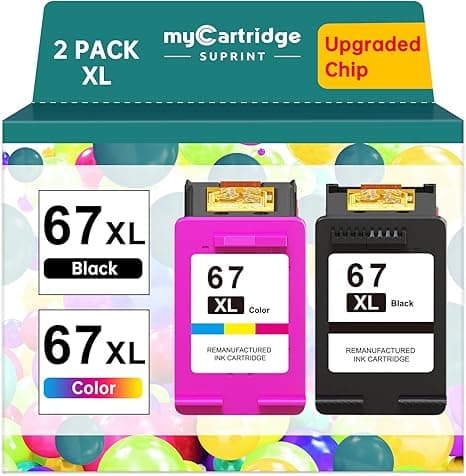
So there I was, low-ink warning blinking, a document due, doing the thing everybody does: pricing a replacement at 4pm on a weekday and getting sticker shock. The genuine HP 67XL high-yield black was running around $45 at the time. For one cartridge. And I'd need color too eventually. That's the moment the compatible 67XL went into my cart instead — roughly half the price, about $22 — and I've now run a stack of them through three different machines in that 2722E/4122E/6022E family. Here's the honest version of how that's gone.
The price math nobody on the box wants you to do
HP doesn't sell you a printer. It sells you a cartridge subscription with a plastic machine attached. The 2722E was cheap on purpose — mine was under forty bucks — because the real money is the ink. Run the numbers across a year and it stops being abstract. I print maybe 200–300 pages a month: school forms, shipping labels, the occasional photo my kid wants taped to the wall. On genuine 67XL that's two, sometimes three high-yield blacks a year plus color. Call it $120–$150 annually in ink alone, more than the printer cost.
The compatible 67XL knocks that roughly in half. At about $22 a black cartridge versus $45, every swap I do puts twenty-some dollars back in my pocket. Over a year of my printing that's real grocery money, not a rounding error. And the page yield I've gotten out of the compatible high-yield has been close enough to genuine that I don't feel cheated — I'm not burning through three cheap ones to match two real ones.
Does it actually fit, or do you fight it?
This is where I was nervous, because a cartridge that doesn't seat is worse than no cartridge. It fits. The drill is the same as genuine: pop the cover, wait for the carriage to slide over and stop, press the little tab to release the old one, and it lifts out. Peel the protective tape off the new cartridge's contacts — and peel it clean, because a sliver of tape left on the gold contacts is the number one reason these throw a "cartridge error." Then push it in until you feel and hear the click. Run a test print.
The click is the tell. On the genuine cartridge the seat feels a touch more confident — a firmer snap. The compatible one seats with a slightly softer click, and the first time I installed one I pressed it twice because I wasn't sure it caught. It had. Test page came out clean, full black, no banding. But I'll be straight with you: the housing tolerances are a hair looser than HP's. Not enough to matter for fit, but you notice it in your fingers.
Where it's as good — and where it's a step behind
For everyday black text? I genuinely cannot tell the printout apart from genuine. Labels scan fine. Forms are crisp. That lease addendum got signed and nobody asked why the print looked off, because it didn't. Color is where I'll give you the careful answer: it's good, it's vivid, reds and blues come out punchy — but on a side-by-side photo print against a genuine cartridge, the genuine HP edges it slightly on skin tones and subtle gradients. If you're printing gallery photos, you'll see the gap. If you're printing a flyer, a coupon, a kid's drawing, a worksheet — you won't, and I don't.
The downsides, said plainly
I'm not going to pretend these are flawless, because that's how you end up with a printer full of dried ink and a grudge. Here's what's actually true after running a bunch of them:
- The chip handshake is the weak spot. HP pushes firmware updates that occasionally get suspicious of non-genuine cartridges. I've had one cartridge throw a "used or counterfeit" warning on first insert. The fix was unglamorous — pull it, wipe the contacts with a dry cloth, reseat — and it took on the second try. But once in maybe ten cartridges, I've had to do that little dance. With genuine HP you never do.
- Packaging is cheap and the QC isn't HP-tight. They arrive in thin plastic clamshells, no fancy box. Out of a multipack I once got one cartridge that primed slow — the first two or three test prints were faint before the ink flowed properly. It cleared itself after a head clean. Annoying, not fatal.
- Shelf life is shorter. Genuine cartridges sit in a drawer for a year and wake up fine. With the compatibles, I've learned not to stockpile more than one spare — leave them too long and the one I had sitting six-plus months needed two cleaning cycles to get going. Buy them closer to when you'll use them.
None of those are dealbreakers for me. They're the tax you pay for keeping $23 a cartridge. But you should know the tax exists before you're standing at the printer wondering why it's complaining.
Why running it dry actually matters
The reason I started this whole thing — that striped, clogged print — is worth taking seriously. An inkjet head that runs bone-dry doesn't just print badly; the nozzles can crust and clog, and on these cheaper HP units a clogged head is sometimes a dead printer, because the head's built into the machine. So the move isn't "squeeze every last drop." The move is: keep a spare on hand and swap at the first real sign of fade. That math only works if the spare is affordable enough that you'll actually buy it ahead of time. At $22, I keep one in the drawer. At $45, I used to gamble and run them to the bitter, head-clogging end — which is exactly how I got into that 4pm mess.
The verdict
Buy genuine HP if you print serious photography, or if you're the kind of person who will be genuinely rattled by an occasional "non-genuine" warning popping up — some folks just want it to never blink, and that's a fair thing to pay for. Buy genuine, too, if your machine is on auto-firmware-update and you can't be bothered to manage that.
For everyone else — and that's most of us, printing forms and labels and the ordinary stuff of a household — the compatible 67XL is what I grab. It fits, it seats with that slightly-softer-but-real click, it lays down black text I can't distinguish from the genuine, and it does it for about half the price. I've reordered them three times now. The first time was nerves and a deadline. Every time after has been because they earned it.



