Troubleshooting & Analysis
I almost paid $45 for a cartridge that costs me $22
That was the moment. Standing in the office supply aisle, holding a single HP 67XL black cartridge with a $44.99 sticker on it, doing the math on a printer I paid eighty bucks for two years ago. One cartridge. Almost forty-five dollars. And the color one next to it wasn't much cheaper. So I'd be looking at close to ninety dollars to refill a machine that, frankly, mostly prints my kid's homework and the occasional shipping label.
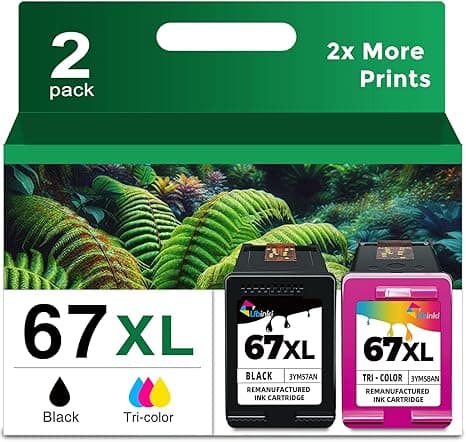
I put it back. Went home, ordered the compatible 67XL for my 2722E for around $22 — roughly half — and waited to see if I'd just made an $80 printer into a paperweight. Spoiler: I didn't. I've now run compatible 67XL cartridges through that little envy-style all-in-one for the better part of a year, and I want to walk you through exactly what that's been like, warts and all, because "it's half price" only matters if the thing actually works.
The price gap is the whole story — here's the real math
Let me put real numbers on it, because vague "save money!" talk is useless. The OEM HP 67XL high-yield black runs me about $40–45 at full retail. The compatible high-yield I buy lands around $22. Call it a $20 gap per cartridge. If you go through, say, four black cartridges a year — light home use, but with a kid printing book reports — that's roughly $80 saved a year on black alone. Add the color side and you're comfortably past $120 in a year back in your pocket.
For a printer that cost less than two cartridges' worth of OEM ink, that gap is genuinely the difference between "I'll print it" and "ugh, just email it to me." A low-ink warning at 9pm the night before something's due shouldn't cost forty-five dollars to make go away.
Does it actually seat right?
This was my first worry. HP's printers are notorious for being fussy about what you feed them. Install on the 2722E was honestly identical to OEM: I opened the cover, waited for the carriage to slide over and stop, pressed the little tab to pop the old cartridge out, peeled the protective tape off the new one, and pushed it in until it clicked. That click is the tell — if you don't feel and hear it, it's not seated, and the printer will throw a fit. With the compatible one I got the same satisfying click on the first try.
One thing worth knowing: peel all the tape, including the thin clear strip over the contacts and the little vent up top. The first compatible cartridge I ever installed, I left the vent sticker on and got a "missing cartridge" error that made my stomach drop for about ninety seconds. Pulled it, peeled the strip, reseated, ran a test print. Fine. That was user error, not the cartridge — but it's the kind of thing OEM packaging sometimes idiot-proofs better.
Print quality: the honest comparison
Here's where I expected the cheap one to fall apart, and it mostly didn't. Black text? Sharp. I printed a twelve-page tax document and a stack of shipping labels and could not tell you which came off OEM and which off the compatible. Crisp edges, solid fill, no ghosting. For 90% of what a home printer does — text, forms, boarding passes — it's a wash.
Color is where I'll be straight with you. On plain paper, photos and graphics looked great, totally fine for a school project or a printed recipe. But side by side on glossy photo paper, the compatible color leaned very slightly warmer — skin tones a touch more orange than the OEM's. We're talking the kind of difference you only notice when you hold two prints next to each other under good light. If you're printing actual photos you want to frame, the OEM color has a small edge. If you're printing the soccer schedule, you will never, ever see it.
The downsides I'm not going to hide from you
Because a review that's all sunshine reads like a lie, here are the real annoyances.
First: the ink-level reporting. HP's software does not love third-party cartridges. I get a "non-genuine cartridge" pop-up the first time I install one — you click through it once and it goes away, but it's there. And the on-screen ink gauge is less accurate; mine sometimes jumps from "half" to "low" faster than it should, or shows low when there's clearly plenty left in a test print. I've learned to ignore the gauge and just print until the page looks faded. Mildly irritating. Not a dealbreaker.
Second: consistency between batches. OEM cartridges are boringly identical every time. With compatibles I've had one cartridge out of maybe ten that printed faint right out of the box and needed a head-cleaning cycle to wake up. After one cleaning run it was perfect for its whole life. But that's a five-minute hiccup OEM never gave me, and if you bought a single cartridge and it was the dud, your first impression would be sour.
Third, a smaller one: the packaging is cheap. Thin plastic clamshell, a sticker that's a little crooked, none of HP's glossy box. Doesn't affect the ink one bit. Just don't expect it to feel premium when it lands on your porch.
Why a dead cartridge is more than an annoyance
Quick word on the part nobody thinks about until it bites them: don't run a cartridge bone-dry on purpose to "get your money's worth." On inkjets, the ink actually helps keep the printhead from drying and clogging. Let it run completely empty and sit, and you can gum up the nozzles — which on these all-in-ones is a real headache to recover. The cheaper the cartridge is, the less it hurts to swap it a little early. That's actually a quiet argument for the compatible: at $22, I replace it the second prints go faint instead of nursing a dying OEM cartridge for three more weeks and risking the head.
So who should buy what?
Buy the genuine HP 67XL if you print real photographs you care about, or if you're the kind of person who'll be bothered by a software pop-up and a slightly-off ink gauge. The color accuracy and the polished experience are worth the extra twenty bucks to some people. No shame in that.
But for everybody else — and that's most of us with a 2722E, 4122E, or 6022E doing homework, forms, labels, and the occasional photo — I grab the compatible. Same crisp black text, color that's fine for everyday printing, half the price, and I stop flinching every time the low-ink light comes on. I've now bought it five or six times over. The first time was a leap of faith. Every time since has just been me saving twenty dollars and not thinking twice. Look, it's ink for an eighty-dollar printer. Pay half, print freely, move on with your day.



