Troubleshooting & Analysis
I didn't believe a $20 cartridge could be fine either
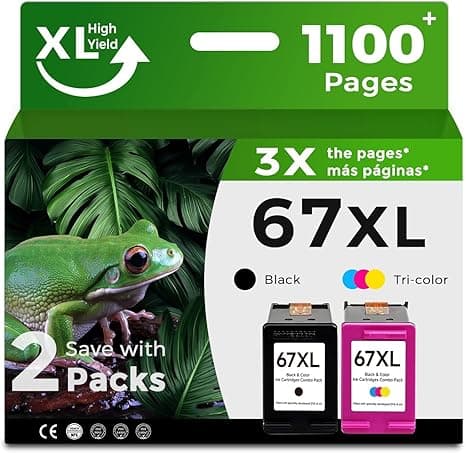
Here's where I started: I'd just paid $24 for a single genuine HP 67XL black cartridge for my 2722E, watched it drain in about six weeks of normal home printing, and thought — there is no way the cheap one is anything but a scam. You've seen the listings. Half the price, vague brand name, a stock photo of a cartridge that may or may not be what shows up. Every instinct I have said skip it. So when a compatible 67XL landed in my cart at roughly twelve bucks, I bought it mostly to prove myself right and write it off.
That was four months and a lot of school forms, shipping labels, and one kid's science-fair poster ago. I'm still using compatibles. Let me walk you through exactly why, including the parts I didn't love.
The money, before anything else
This is the whole reason you're reading, so let's not bury it. A genuine HP 67XL high-yield black runs me about $24 at the shelf price I keep seeing. The compatible I've been buying for my 2722E sits right around half that — call it $12, sometimes a hair less in a two-pack. On the color side the gap is similar.
Now do the year. I'm not a heavy printer, and I still go through roughly a black cartridge every six to eight weeks plus a color every couple months. On genuine HP that's somewhere north of $150 a year just feeding the machine. On compatibles I'm closer to $75. That $75 difference is the part HP really doesn't want you doing math on — because the printer itself, the 2722E or 2710E or 6422E, often costs less than a year of feeding it genuine ink. The hardware is the bait. The cartridge is the hook.
So the question was never "is the compatible as good as a brand I trust." It was "is the compatible good enough that saving seventy-five dollars a year is the smart move." Different question. Better question.
Does it actually fit and click?
This was my first real worry — that some loose third-party shell would rattle in the carriage or throw an error. It didn't. The 2722E install is genuinely four steps and the compatible respected all of them. Lift the cover, wait for the carriage to slide over and stop, press the little tab to pop the old one loose, peel the tape off the new one, push it in until you feel that small positive click, run a test print. That click is the thing I was listening for, honestly. On the compatible it seats with the same snap as the genuine. No wobble, no "cartridge missing" tantrum.
One tip I learned the annoying way: the protective tape on the compatibles covers the contacts a little more generously than HP's does, and the first one I installed I left a sliver of tape on a contact and got a non-recognition error. Thirty seconds to pull it, reseat, done. Pull all the tape. Wipe nothing — your fingers on the copper contacts cause more problems than they solve.
How it actually prints
Black text is where I expected the cheap one to fall apart, and it just... didn't. Sharp, dark, no ghosting on the school forms or the shipping labels. Side by side with a page I'd printed weeks earlier on genuine HP, I could not tell you which was which, and I went looking.
Color is where you find the real difference, if there is one. On plain paper — coupons, a kid's worksheet, a map — it's a dead heat. On glossy photo paper, looking hard, the genuine HP color is a touch richer in deep blues and skin tones. A touch. If you print gallery photos to frame, you'll notice it and you should think twice. If you're printing a birthday banner or a recipe card, you will never, ever see it. I print maybe two real photos a year, so for me this is a non-issue. Be honest with yourself about which printer you actually are.
The downsides, because there are some
I'm not going to pretend this is free money. Three real things bugged me.
First, consistency between cartridges. Genuine HP is boringly identical every single time. With compatibles I've had one out of maybe eight that primed a little streaky out of the gate — a couple of head-cleaning cycles sorted it, but a head cleaning burns ink, which slightly eats your savings and is just irritating. You're trading a few dollars for the occasional small hassle. Going in knowing that makes it fine. Being blindsided by it makes you angry.
Second, the packaging is cheap and the labeling is inconsistent. The genuine box tells you the fill date and yield. The compatibles come in a thin plastic clamshell with a sticker, and twice the "high-yield" one felt like it ran down faster than the genuine 67XL's rated page count. Not dramatically — but I don't fully trust the printed yield numbers on the third-party ones, so I keep a spare in the drawer. At $12 a cartridge, keeping a backup is painless. At $24 you'd hesitate, and that hesitation is exactly when the ink dies mid-shipping-label and ruins your afternoon.
Third — and this is more annoyance than dealbreaker — the 2722E firmware really wants you to use HP ink and will occasionally pop a "non-HP cartridge" warning. You click through it once and it remembers. But if you ever let the printer do a firmware update over Wi-Fi, it can get fussier about compatibles again. I turned auto-update off. That's a choice you should make with eyes open.
Why a dead cartridge is its own little disaster
People underrate this part. The pain of ink isn't really the cost — it's the timing. It always runs dry on the boarding pass at 6 a.m., or the return label the hour before the carrier closes, or the permission slip due tomorrow. When a single genuine cartridge is $24, you ration. You think "I'll buy ink next week" and then the warning hits at the worst moment. When refills are $12, you just keep one on hand and you never get held hostage by a low-ink warning again. Cheaper ink, weirdly, made me less stressed about ink, because I stopped treating each cartridge like a precious thing.
So who should still buy genuine?
If you print real photos you frame or sell, or you run a business where color has to be pixel-identical batch to batch, buy the genuine HP 67XL and don't think about it. The consistency is worth the markup for you.
For everyone else — home printing, homework, labels, forms, the occasional fun color page on the 2722E, 2710E, or 6422E — I came in expecting to catch the cheap cartridge cheating and I never did, beyond one streaky unit and a firmware nag. For twelve dollars instead of twenty-four, doing the same job on every page that matters to me, I'd buy the compatible again. And I have, four times now, with a fifth sitting in the drawer.



