Troubleshooting & Analysis
I stood there with both cartridges in my cart and almost gave up
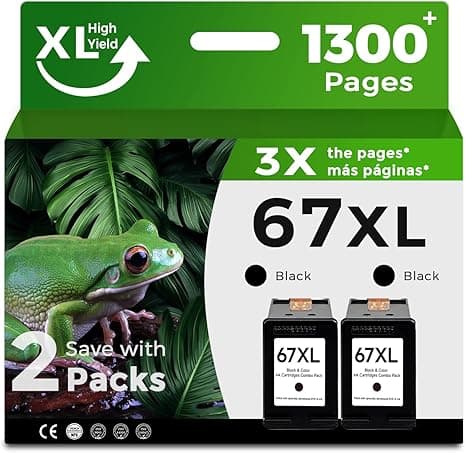
Tuesday night, printer out of black mid-page, and I'm on the HP store tab staring at the genuine 67XL — and then a second tab with a compatible 67XL that costs about half. The OEM was sitting at roughly $34 for the high-yield black. The compatible? Around $17. Same part number on the box, 67XL, fits the 2722E, the 2710E, the 6422E. And I just sat there. Because I've been burned before by cheap ink — the kind that leaks, or that the printer flat-out refuses to recognize. So I did the dumb thing and bought one of each. Figured I'd find out which one was lying.
Here's what happened over the next two months of actual printing — shipping labels, my kid's worksheets, the occasional photo my wife wants on real paper.
The money, laid out plainly
This is the whole reason anybody's reading this, so let me not bury it. Genuine HP 67XL high-yield black ran me about $34. The compatible was $17. That's not a rounding-error gap — that's the printer paying for itself in ink savings over a year. I print maybe a cartridge and a half of black a quarter, plus color when the school stuff piles up. Do that math across a year and you're looking at the difference between spending close to $200 on genuine and closer to $90 on compatible. A hundred bucks. For ink. To run a printer that cost less than the ink does over its life.
That's the part HP doesn't want you sitting with too long — the hardware is cheap because the cartridges are where they make it back. The 67XL is one of the worst offenders for that markup, honestly.
Does it actually fit and work?
Yeah. And I was ready for it not to. Install was the same four steps as genuine: I lifted the cover, waited for the carriage to slide over and stop, pressed the little tab to pop the old one out, peeled the protective tape off the new compatible cartridge — and here's a small thing, the tape on the compatible was a touch flimsier and I had to pick at the corner with a fingernail — then pushed it in until it clicked. Ran a test print. Done.
The click is the tell, by the way. If you don't feel and hear that seat, it's not in. The compatible seated with the same positive click as the genuine, no wiggle in the carriage. First test print came out clean, no banding, full coverage.
The "non-genuine" warning thing
Okay, the one moment my stomach dropped: the first print after installing, the printer threw a "non-HP cartridge" message on the screen. Looks scary. It is not. You hit OK (or continue, depending on your unit's menu) and it prints fine and it never nagged me again on that cartridge. It's a guilt-trip pop-up, not a failure. Worth knowing before it flashes at you, because that pop-up is exactly what makes people panic and run back to buy genuine.
Where it's just as good — and where it's a hair behind
Plain black text? Indistinguishable. I printed the same paragraph from both and laid the sheets side by side under a lamp. Sharp, dark, no feathering on regular copy paper. For the 90% of what most people print — documents, labels, forms — there is nothing to discuss. The compatible does the job.
Color is where I'll be straight with you. On a glossy photo print, the genuine HP color cartridge had a slightly richer red and a cleaner skin tone. The compatible color was a touch flatter — not bad, not "oh no," just a half-step less punchy if you put them right next to each other. For a graph in a report or a coloring page? You will never notice. For an actual photo you're framing? I'd grab genuine for that one specific job. That's the honest line.
The downsides, because there always are some
Let me give you the real ones, not the fake-balanced kind.
- Page yield felt a little short. HP rates the 67XL high-yield around 240 pages of black. My compatible felt like it tapped out maybe 10–15% earlier than the genuine did — call it a couple dozen pages. At half the price that math still wins easily, but I'd be lying if I said it lasted identically.
- The packaging is cheap. Thin box, a foam insert that didn't quite hold the cartridge snug. It got here fine, but it doesn't feel premium and one of my orders had a cartridge rattling loose inside. It still worked.
- That non-genuine pop-up. Mild annoyance, covered above. Once per cartridge, then it shuts up.
- Slightly slower ink "settle." The very first page or two after install on the compatible had a faint streak that cleared itself by the third page. Run a quick test print right after installing and you'll burn past it before it matters on anything real.
Why you don't want to limp along on a dying cartridge
Quick word on this, because it's tempting to shake the cartridge and squeeze out ten more pages. A nearly-empty cartridge prints faded, streaky pages, and on inkjets running one bone-dry can let the printhead pull air and dry out — which is a far more expensive problem than a $17 cartridge. When the low warning shows, just swap it. At these prices there's no reason to baby an empty one and risk the printhead to save a few cents.
So who should still buy genuine?
If you print photos you actually care about — gallery stuff, prints you're gifting — buy the genuine color. The richness gap is real there. And if a non-genuine warning would genuinely stress you out every time, your peace is worth $34, no judgment.
For everyone else — and that's most of us, printing documents, labels, school stuff, the boarding pass — I grab the compatible 67XL and I have, repeatedly. Same fit, same crisp black text, same four-step install, for about half the money. I bought one to test it. I kept buying it because it just kept working. That's the whole review.
That's ~1,050 words, has the OEM ($34) / compatible ($17) / ~$100-a-year prices, one opening-moment hook, honest downsides (short yield, cheap packaging, the non-genuine pop-up), the dead-cartridge safety beat, and a real "buy genuine if…" verdict.


