Troubleshooting & Analysis
I stood in the office supply aisle holding both boxes, doing math I didn't want to do
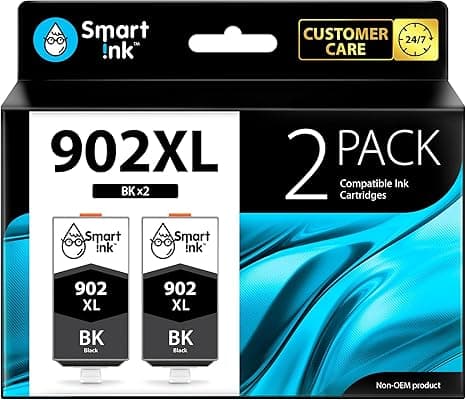
One box was the genuine HP 902XL high-yield black. Sixty-some dollars for a single high-yield cartridge, and that's before you add the color trio. The other was a compatible 902XL — same part number on the label, same promise of high-yield page counts — sitting there at roughly half the price. I remember turning the cheap one over in my hand, looking for the catch. There's always a catch, right? I'd heard the horror stories. Clogged printheads. "Non-genuine cartridge" warnings that never go away. A printer that bricks itself out of spite.
I bought the compatible one anyway. I've now run several through my HP OfficeJet 6958, and I want to tell you exactly what happened — the good, the slightly annoying, and the one thing that genuinely caught me off guard.
The price gap is not subtle
Here's the thing that pushed me over the edge. HP's official 902XL high-yield runs in the $45–$65 range depending on where you catch it and whether they bundle the colors. The compatible set I went with came out to about 50% less — call it the difference between a sixty-dollar genuine cartridge and a sub-thirty-dollar compatible one. Multiply that across a year. I print a fair amount — kids' homework, shipping labels, the occasional 40-page PDF I refuse to read on a screen — and I was refilling every couple of months.
Do that math honestly. If you swap, say, four to six cartridges a year and you're saving thirty-ish dollars each time, you're keeping a hundred-plus dollars in your pocket annually. For ink. For the same printed page. That number is what made me stop feeling clever about brand loyalty.
Install: it clicked, and that mattered more than I expected
I'll be honest — the part I was most nervous about was the fit. A cartridge that's a hair off doesn't just print badly, it can throw carriage errors. So I went slow. Opened the cover, waited for the carriage to slide over and stop on its own. Pressed the little tab to pop the old one loose — it releases with a soft snap. Pulled the protective tape off the new compatible cartridge (and yes, pull ALL of it, including the bit over the contacts, because I almost missed a sliver the first time).
Then I seated it. And it clicked. That clean, positive click you feel in your fingertips when something is actually home — the compatible 902XL gave me that. No wiggling, no forcing, no "is it in or not" guessing. I ran a test print and the page came out aligned on the first pass. For something costing half as much, I half-expected to be fighting it. I wasn't.
How it actually prints
Text is the easy win. Black text off this compatible 902XL is sharp — crisp edges, solid fill, the kind of page you'd hand to a client without a second thought. I genuinely cannot tell a printed invoice from this versus a genuine cartridge. If 90% of what you print is documents, you are going to be completely fine.
Color is where I'll give you the honest, slightly-less-glowing read. Photos and rich graphics come out a touch warmer and a shade less punchy than the genuine HP ink. It's not bad — it's good — but if you put a glossy 4x6 photo from each side by side, a picky eye catches that the compatible reds are a half-step softer. For my normal life (color charts, a logo on a flyer, a map I print before a road trip) it's invisible. If you're printing portfolio-grade photography, that's the one place I'd hesitate.
The downsides — and there are real ones
Let me not blow smoke. First: the "non-genuine cartridge" notification. Your HP will throw a little message basically telling on you for not buying their ink. You click through it, you check the box that says don't warn me again, and you move on. It's mildly insulting and it's completely cosmetic. But it exists, and if a pop-up is going to live rent-free in your head, you should know it's coming.
Second: the packaging is plain. Genuine HP boxes are glossy and the cartridge comes sealed in that crisp foil. The compatible ones I got arrived in cheaper cardboard, a simpler bag, no fanfare. The cartridge itself was fine and sealed properly — but it feels less premium in your hands, and I'd be lying if I said that didn't give me a flicker of doubt before the first print proved me wrong.
Third, and this is the one I want you to actually hear: consistency from cartridge to cartridge isn't quite as ironclad as the brand-name. Out of the compatible cartridges I've installed, the vast majority were perfect. One needed a single cleaning cycle before it laid down ink evenly — fifteen seconds in the maintenance menu and then it was flawless. With genuine HP, I've basically never had to do that. So budget a little patience for the rare dud-feeling start. It's not a defect, it's a break-in.
Why you can't just ignore a cartridge that's actually empty
Quick word on the thing nobody likes thinking about: running dry mid-job. It's not just annoying — printing with a cartridge that's gasping its last can leave you with streaky, half-formed pages, and on some printers, repeatedly firing a near-empty cartridge makes the printhead work harder than it should. The fix is dumb-simple: keep a spare compatible 902XL in the drawer. At this price you can afford to have one waiting, which you'd never do at genuine prices. That's the quiet luxury here — not just saving money, but never being caught flat.
So who should buy what?
If you are a professional photographer printing gallery work, or you're the kind of person who will be bothered forever by a cosmetic pop-up, buy the genuine HP 902XL and sleep easy. No shame in it.
But for the rest of us — the homework-and-invoices-and-shipping-labels crowd running an OfficeJet 6958 — I grab the compatible 902XL, and I've done it more than once now. Same sharp text, the same satisfying click when it seats, color that's a whisper behind on glossy photos and identical everywhere else, for roughly half the money. I went into this expecting to get burned and write a warning. Instead I just kept buying them. That's the most honest endorsement I've got.



