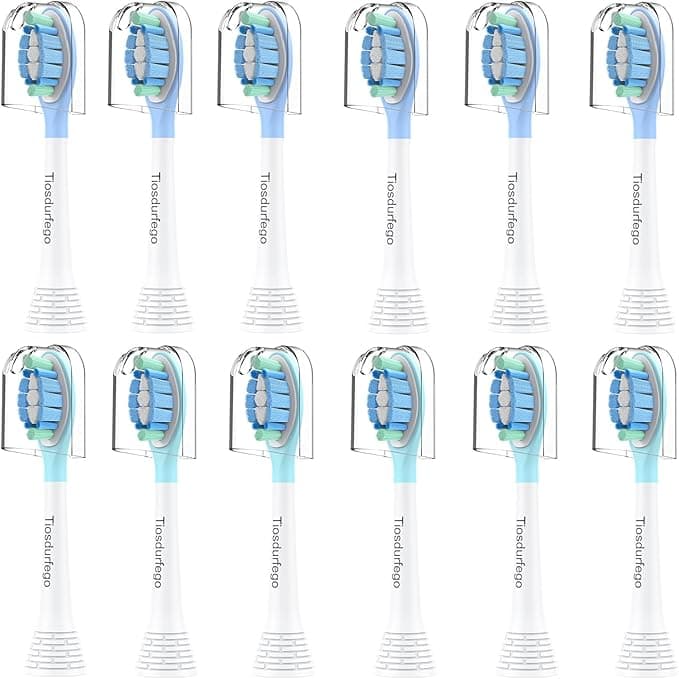
Troubleshooting & Analysis
The click is the first thing I trust
There's a specific sound a brush head makes when it seats right on a Philips W3 handle — a short, plasticky snk that you feel in your fingertips more than you hear. The first time I pushed one of these compatible heads onto my handle, I braced for it to feel wrong. Loose. Wobbly. It didn't. Same click. Same little resistance right before it locks, then that quiet snap. I stood at the sink at 11pm pressing it on and pulling it off three times like a weirdo just to make sure I wasn't fooling myself.
I wasn't. It seats the same as the real one. And that mattered to me, because I'd been paying Philips prices for years and I was tired of it.
The math that finally made me switch
Here's what pushed me over the edge. A genuine Philips replacement head, bought one or two at a time, runs me right around the price of a nice lunch every quarter. You're supposed to swap heads every three months, so that's four a year, and if you've got two people in the house brushing, you're staring down eight heads annually. At OEM rates that adds up fast — easily $50 to $60 a year per person, more if you only buy single packs.
The compatible 8-pack I bought cost me about what two genuine heads would. Two. For eight. So instead of replacing one head for the price of a pack of eight aftermarket ones, I'm now covered for a full year — both of us — for roughly $24. That's not a rounding-error saving. That's a "why did I wait this long" saving.
And before you ask: yes, I kept track. I marked my calendar, I actually swapped on schedule for once, and I still came out way ahead.
Fit and install — no fuss, honestly
Swapping is stupidly simple and these don't change that. You pull the old head straight off — it comes off with a firm tug, no twisting, no buttons. I gave the metal shaft a quick rinse under warm water to clear off the gunk that builds up at the base (do this, people skip it and then wonder why things smell). Then you push the new head on until it clicks. Three months later you do it again.
The fit on these is snug. Not "I had to force it" snug — just enough that it doesn't rattle or spin on the shaft while you're brushing. I've had cheap heads from other brands that left a tiny gap at the base and you could feel a faint buzz of play when the motor kicked on. Not these. They sit flush.
Performance: where it matches, where it's a half-step behind
The bristles are DuPont, same as what the good OEM heads use, and you can tell. After a brush my teeth have that squeaky, just-left-the-dentist feel — the front surfaces especially. The bristle pattern hits the gumline well, and the rounded tips don't shred after a week the way some bargain heads do. I'm a month and change into this set and the bristles still stand up straight. No fanning out, no flattening.
Where's the half-step behind? The bristle indicator dye. Genuine Philips heads have those blue bristles that fade to white as a wear gauge so you know when to replace. These have a version of that, but honestly the fade is less dramatic and a little harder to read at a glance. I ended up just trusting my calendar instead of squinting at the bristles. Minor. But it's real, and I said I'd tell you the real ones.
The downsides — and there are a couple
First, the smell. New out of the wrapper, there's a faint plastic-and-warehouse smell to the heads. Not chemical, not alarming, just that fresh-injection-molded scent. I ran the first one under hot water for fifteen seconds and brushed once with just water before putting toothpaste on it, and by day two it was completely gone. By day three I'd forgotten it ever smelled like anything. But the first head out of the bag, that first morning — yeah, you'll notice it.
Second, the packaging is cheap. The heads come in a thin blister card, no individual seals, no fancy box, none of the satisfying unboxing Philips gives you. Each head sits in its own little plastic pocket and that's it. Does it affect the product? No. But if you're the type who feels reassured by premium packaging, this'll feel a little bare. I'd rather they spent the money on the bristles than the box, personally.
Third — and this is small — the printing on the back of the heads, the brand mark, isn't as crisp as the laser-etched OEM logo. You'll never see it once it's on the handle. But it's a tell that you're holding an aftermarket part.
Why the worn-out head you're using right now is the real problem
Here's the thing nobody likes hearing. The reason to care about any of this isn't the brand on the head — it's what an old head does to your mouth. Frayed, splayed bristles don't just clean worse; they get aggressive on your gums, and a brush head you've been riding for six months is, bluntly, a little bacteria farm. Dentists will tell you a worn head fails to clear plaque and can do damage on the way. The whole point of swapping every three months is to stay ahead of both.
And that's exactly why the price matters. If replacing on schedule costs you $55 a year, you stretch heads to five and six months to save money — I know I did. When a year of heads costs $24, you actually swap them when you're supposed to. The cheap option, in this case, is the one that keeps you brushing with fresh bristles.
The verdict
Who should stick with genuine Philips? If you're someone who needs the bristle-fade indicator to be glaringly obvious, or you just don't want to think about whether a third party got the fit right, pay up and buy OEM. No shame in it.
But me? Same DuPont bristles, same clean feel, same reassuring click onto the W3 handle, eight heads for the price of two — I grabbed this set, I've been using it for weeks without a single regret, and when this pack runs out I'll buy it again. Look, the plastic smell fades in a day and the packaging goes in the trash anyway. What's left is a brush head that does the job for a fraction of the cost. That's an easy call.



