Troubleshooting & Analysis
Two original Philips heads cost the same as eight of these
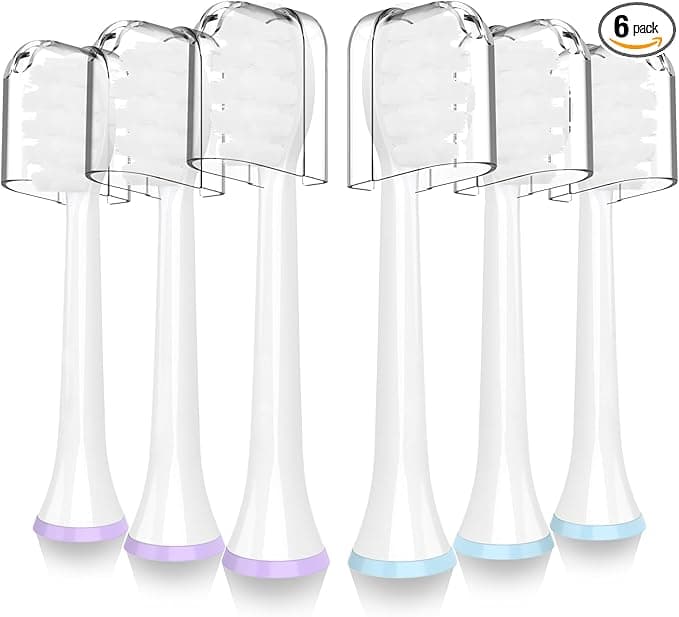
Let me put the number in front of you first, because that's what stopped me cold. A two-pack of genuine Philips Sonicare brush heads runs about $30 — call it $15 a head. The compatible heads I've been running on my Philips W3? I paid roughly the same $30 and got eight of them. That's under $4 a head versus $15. Same shaft, same DuPont bristles, same three-month swap schedule. I did the math on a napkin in the store and almost didn't believe it, so I bought a pack to call the bluff.
Spoiler: the bluff held up. But not perfectly, and I'm going to tell you exactly where it doesn't.
What you're actually paying the OEM tax for
Here's the annual picture. Brush heads are supposed to come off every three months — four a year. On genuine Philips heads, that's roughly $60 a year, every year, for as long as you own the handle. The compatible eight-pack I bought is a two-year supply for thirty bucks. So we're talking $60/year against about $15/year. Over the life of one W3 handle — these things last five, six years easy — that gap is real money. A couple hundred dollars that does nothing but sit on a plastic stick in your bathroom.
And the thing the OEM price is supposedly buying you — the bristles — is the part where the compatible heads surprised me most. They use DuPont bristle filament, same as the name-brand. I'm not taking that on faith from a listing. I could feel it. The bristles have that slightly stiff, springy bite for the first few weeks and then soften into the gum-line the same way the Philips ones do. My teeth felt exactly as clean at my last cleaning, and my hygienist didn't say a word, which is the highest praise that woman gives.
Does it actually click on? Yeah — mostly
Installing one is nothing. You pull the old head straight off the metal shaft — it's friction-fit, no twist, no button — give the shaft a quick rinse under warm water to clear any gunk, and push the new head down until you feel it seat. On a genuine head you get a clean, confident click and it sits flush.
The compatibles click too. But I'll be honest about the fit, because this is the one place the savings show up physically: the collar where the head meets the handle is a hair looser than OEM. Not loose enough to wobble or rattle while brushing — I've run mine for months and it's never spun or popped off — but if you press the old Philips head and the new one side by side, the genuine one hugs the shaft just a touch tighter. The first time I seated a compatible I actually pulled it back off and re-seated it twice because my brain expected that vault-door snugness and got something slightly softer. It's fine. It's just not identical, and I'm not going to pretend it is.
The downsides, for real
So here's where I earn your trust. There are three things I noticed, and you should know all of them before you click buy.
First, the plastic smell. Fresh out of the bag, the first head had a faint chemical-plastic odor — the same smell a new shower curtain has. It's mild and it lives in the head, not your mouth, but I ran the first one under hot water and let it air-dry overnight before using it. Smell was basically gone by day two or three. With genuine heads I've never noticed this at all, so it's a real difference, just a short-lived one.
Second, the packaging is cheap. The eight heads come bagged together, not individually sealed in those tidy little Philips clamshells. Doesn't bother me — I keep them in the drawer and they're clean — but if you're the type who wants each one hygienically wrapped until the day you use it, this isn't that. You're paying a quarter of the price; the savings come from somewhere, and it's the box.
Third, and this is the one to actually weigh: there's some pack-to-pack variation. Across my eight, seven were dead-on perfect. One had bristles that splayed out a little faster than the rest — by month two it was looking ratty when its siblings still looked fresh. At under $4 a head I genuinely did not care; I tossed it early and grabbed the next one. But if you bought a two-pack of genuine Philips and one was a dud, you'd be annoyed, and rightly so. Buying compatible means accepting that one in a handful might be a touch off. The price makes that easy to swallow.
Why you can't just stretch the old one
Quick word on the part everyone's tempted to ignore — running a head past its expiration. The three-month swap isn't Philips padding their sales. Worn, splayed bristles stop reaching the gum line and just smear plaque around instead of lifting it, and a frayed head can actually scrape and recede your gums over time. My dentist flagged exactly this on a head I'd stretched to five months once. On top of that, an old brush head is a damp, warm, used-every-day home for bacteria — it does not get cleaner with age. The honest reason the cheap compatible heads matter isn't just the savings. It's that at $4 a head you'll actually replace them on schedule instead of guiltily nursing a $15 one for half a year because tossing it feels wasteful. Cheaper heads, swapped on time, beat a premium head you're too cheap to retire.
Who should skip these
If you're someone who needs every consumable to be factory-sealed and bit-for-bit identical, or you'd lose sleep over one slightly-off head in a pack of eight, buy the genuine Philips. No shame in it — that snugger collar and the consistency are what you're paying the premium for, and for some people that's worth $45 a year. Same goes if your dentist specifically told you to use a particular OEM head for a gum condition. Listen to them, not me.
But for everyone else — for the person standing in the aisle holding a $15 head in one hand and doing the eight-for-thirty math in the other — I grab the compatible. I have, repeatedly. Same DuPont bristles, same clean teeth at my checkup, a slightly looser click and a faint new-plastic smell that's gone in two days. That's the entire downside. For something like a tenth the cost per head, doing the exact job my mouth needs done, I'd buy them again. And I already have — I'm three heads into that eight-pack and not looking back.



