Troubleshooting & Analysis
The bristles told on me before my dentist did
I caught it in the bathroom mirror on a Tuesday. The brush head on my Philips W3 had gone flat — not worn, flat, like a cheap paintbrush left bristle-down in a jar. The blue indicator tufts had faded to white months ago and I'd just kept going, because who actually swaps these on schedule? Then at my cleaning the hygienist scraped a ridge of plaque off the back of my lower molars and said the thing nobody wants to hear: "You're brushing, but it's not doing much anymore." That was the splayed-out head's fault. A dead brush head doesn't clean — it just smears.
So I went home annoyed and did the math, and the math is where this gets interesting.
The price gap is the whole story
Genuine Philips Sonicare heads for the W3 run me about $12 each when I buy a two-pack, so call it $24 for two. You're supposed to replace every three months, which means four heads a year. Four OEM heads is roughly $48 annually — and honestly more, because the genuine three- and four-packs aren't the bargain they pretend to be once you do the per-head breakdown.
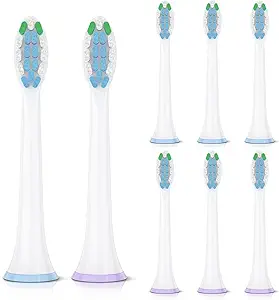
The compatible heads I switched to? I paid about $24 for an eight-pack. Eight. For the price of two originals. That's two full years of brush heads for what Philips charges for six months. I sat there looking at the cart and thought, okay, either these are garbage and I've wasted twenty-four bucks, or I've been overpaying for plastic and nylon for years. I bought them to find out.
Do they actually fit the W3? Yes — and the click matters
This was my first worry. Sonicare heads aren't a screw-on or a clamp; they slide onto a metal shaft and seat with a little snap. A bad knockoff fits loose, wobbles, and rattles when the motor fires. I was bracing for that.
Install is genuinely a ten-second job. Pull the old head straight off the shaft — it comes off with a firm tug, no twisting. Rinse the metal shaft under warm water, because there's always a film of old toothpaste and mineral gunk down at the base that nobody thinks about. Then push the new head straight down until it clicks. And it does click. That seating snap on these compatibles is firm — same shaft diameter, same little internal collar, no play side to side. I grabbed the head and tried to wiggle it. Nothing. It sits as tight as the Philips did.
I will give you one honest fit note: out of my eight-pack, one head went on with a slightly stiffer push than the others. Not loose — stiff, the opposite problem. A few seconds of working it down and it seated fine and has stayed put for weeks. So the tolerances aren't perfectly identical head to head. But not one of them came out loose, which is the failure mode that would actually scare me.
How they clean — and where they're a hair behind
The bristles are DuPont nylon, same material the genuine heads use, and you can feel it. That slightly soft, rounded-tip feel on the gumline is there. After three months on my old splayed OEM head, switching to a fresh compatible felt like switching to a fresh OEM head — that clean, slightly polished tooth-surface feel you get the first week of any new head. My teeth squeaked. The plaque ridge the hygienist found hasn't come back.
Where's the gap? Two small things, and I want to be straight about both. First, the colored wear-indicator bristles fade a touch faster than I remember the genuine ones fading — they're telling me to replace maybe a couple weeks early, which is harmless but means I shouldn't trust the color alone. Second, the bristle field on these compatibles feels very slightly firmer the first day or two before it breaks in. If you've got sensitive gums you'll notice it. By day three it softens to match what I'm used to and I forget about it entirely.
The real downsides — let me actually sit on this
The packaging is cheap. Eight heads come in a thin plastic blister tray with a paper card, no individual hygienic caps like the genuine retail packs sometimes include. That bugged me at first — these are going in my mouth and they ship in a baggie's worth of plastic. I rinse every head under hot water and give it a thirty-second soak before first use now, which I'd honestly recommend doing with OEM too, but it feels more necessary here.
There's also a faint plastic smell on the very first use. Not chemical, not alarming — just that new-molded-plastic note you get from anything fresh out of a bag. It's gone after the first brushing and a rinse. If you're sensitive to that sort of thing, run one cycle without toothpaste first and you'll never notice it.
And the printing on the heads is a little rough compared to the crisp genuine branding — slightly fuzzy logos, the kind of detail that tells you exactly which factory line this came off. It has zero effect on cleaning. It just reminds you that you bought the value option. I made my peace with that for $24 less.
Why a worn head is the part you can't cheap out on by ignoring it
Here's the thing my hygienist drove home, and it's not a scare line — it's the actual reason this matters. Flattened, splayed bristles don't reach the gumline or the spaces between teeth. They ride over the top of the plaque instead of disrupting it. That's how I built up the ridge I didn't know was there. Worse, an old head that's been damp for months is a genuinely grimy little object — the base where the bristles meet the plastic holds bacteria, and you're putting that back in your mouth twice a day. The real win of an eight-pack isn't just the price. It's that at this cost, I actually swap heads on time now instead of nursing a dead one for half a year to save money.
Who should skip these, and what I actually do
If your gums are genuinely sensitive or you've had recent dental work and your dentist specced a particular soft head, buy the genuine one your dentist named and don't experiment — that's not the place to save twenty bucks. Same if the wear-indicator color is the only way you'll ever remember to replace, since these fade early.
For everyone else with a standard Philips W3 and a normal mouth? I've been running these compatible heads for months, my last cleaning came back clean, and I've got six more sitting in the drawer that cost me almost nothing. Same DuPont bristles, same firm click onto the shaft, same job done — for a quarter of the per-head price. I bought the eight-pack to test it. I've already reordered. That's the most honest verdict I can give you.



