Troubleshooting & Analysis
The click is what sold me, weirdly
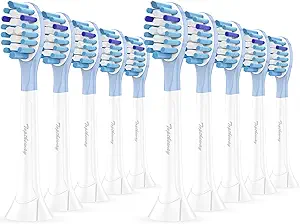
I almost returned the first compatible pack before I even used it. Not because of how it brushed — because of a sound. My genuine Philips DiamondClean heads always seated with this confident little snick, a plastic-on-metal click you feel up through the handle. The first off-brand head I pushed on went quiet. Just a soft thunk and then nothing. I stood there at the sink at 11 p.m. thinking, great, twenty bucks down the drain, this thing's going to fly off mid-brush and ricochet off the mirror.
It didn't. Turns out I just hadn't shoved it down far enough. Pushed harder, got the click. Four months later I'm still using these, and I want to walk you through exactly what I noticed — the good, the genuinely annoying, and the part where I tell you who should ignore me and buy the real ones.
The math that started this whole experiment
Here's what pushed me off OEM. A genuine DiamondClean replacement head runs me about $11 apiece at the drugstore, and Philips wants you swapping every three months. That's roughly $44 a year for one person. Two people in the house? You're staring at $88 a year to scrub plaque off your teeth. For a piece of molded plastic and some bristles.
The compatible set I grabbed was an 8-pack for around $22 — basically the price of two genuine heads, for a full two years of replacements. So for one person that's $11 a year against $44. I did the dumb thing and ran the numbers on a sticky note and it was a four-to-one gap. At that point you're not really debating quality anymore, you're debating whether the cheap one is going to actively hurt you. So I tested that instead.
Fit and install — does it actually seat?
The DiamondClean swap is about the easiest "replacement" job there is, and the compatible heads don't change that. You pull the old head straight off the metal shaft — it resists for a second, then pops. I rinse the shaft under warm water because three months of toothpaste sludge builds a little gray ring down there that nobody talks about. Then you push the new head on until it clicks.
That click is the one thing I'd flag. On the genuine heads it's crisp and obvious. On these compatibles, the tolerance is a hair looser — the very first push felt mushy, like the collar wasn't grabbing. By the third or fourth head out of the pack I'd learned the trick: line up the metal post, push past where you think it's done, and you'll feel it lock. Once seated, it doesn't wobble, doesn't rattle at high speed, doesn't walk loose over a week of brushing. But yeah, the install confidence is slightly lower. First-timers will second-guess it. You won't after one swap.
How it actually brushes
This is where I expected to feel robbed and didn't. The pack I got advertised DuPont bristles, and honestly? My teeth feel the same dentist-visit smooth they did with the Philips heads. The bristle field is dense, the trim isn't ragged, and the oscillation transfers fine — you get that same buzzing, slightly ticklish scrub against the gumline. I went in for a cleaning at the four-month mark fully expecting a lecture about plaque. Got a clean bill. No new spots, no "you've been slacking."
Where it's a touch behind: the bristles soften faster. My genuine heads held their shape closer to the full three months. These start splaying at the edges around week eight or nine — you can see the outer rows fanning out before the calendar says it's time. Which matters, because a frayed brush head stops doing its job. Splayed bristles skate over the gumline instead of digging into it, and worn bristles can actually scrape and irritate gums rather than clean them. So I've started swapping these every two months instead of three. And even doing that — eating one extra head a year — I'm still paying a quarter of the OEM cost. The math survives the early wear.
The downsides I'm not going to sugarcoat
Two real ones, beyond the soft-click and the faster fray.
First, the smell. New heads out of the bag had a faint plastic-and-something odor — not chemical-harsh, but noticeable on the first morning brush. Kind of a "new shower curtain" thing. I ran the first head under hot water for thirty seconds and did a quick dry run before putting it in my mouth, and after two or three uses it's gone completely. But that first brush, you'll notice it.
Second, the packaging is cheap and the quality control is real-world. Eight heads come in a thin plastic clamshell, no individual wrapping, no fancy color-coded rings like Philips does so each family member knows whose is whose. Out of my pack of eight, one head had a slightly crooked bristle trim — cosmetically off, brushed fine, but if you're a perfectionist it'll bug you. That's the tax you pay at this price. You're not getting boutique packaging or 8-out-of-8 flawless units. You're getting heads that work, in a bag.
Oh — and the print quality on the model-fit chart was blurry enough that I double-checked online that these actually fit the DiamondClean and not just the cheaper Philips handles. They do. But the brand isn't spending money making you feel reassured. You have to bring your own confidence.
So who should buy what?
Buy the genuine Philips heads if any of this is you: you've got sensitive gums and need the bristle stiffness dialed in exactly, you genuinely can't be bothered to swap a little more often, or that first-brush plastic smell is a dealbreaker. There's no shame in paying for the polished version. Some people want the click to be perfect and the bag to feel premium, and that's a legitimate thing to spend $44 a year on.
But me? I run a busy bathroom, I'd rather swap a slightly-faster-wearing head every two months and pocket the difference, and after four months and a clean dental checkup I have zero evidence the cheap ones are doing anything worse to my actual teeth. For roughly $22 instead of close to $90 a year for two of us, doing the same job, I bought them again. Already have the next pack in the drawer. The soft first-click stopped bothering me by day two — and my dentist couldn't tell the difference, which is the only review that really counts.



