Troubleshooting & Analysis
I didn't believe a $20 filter could be fine either
Here's where my head was at. My Dyson V15 had been losing suction for a few weeks — that sad, fading whine when you pull it off the dock — and the filter was the obvious culprit. So I went looking, and the genuine Dyson replacement was sitting there at around forty bucks for what is, let's be real, a foam cone and a pleated cap. Then the algorithm showed me a compatible one. Twenty dollars. Maybe less. And my first thought wasn't "great deal." It was: that's the part that protects a $700 motor, and you want me to trust the cheap one?
I almost didn't. I'm telling you that up front because if you're hesitating right now, I get it. I sat on it for two days. Then I bought the compatible filter anyway — partly to settle the argument in my own head, partly because forty dollars for foam annoyed me on principle. I've been running it for about five months now. Here's the honest report.
The fit — which is the thing you're actually worried about
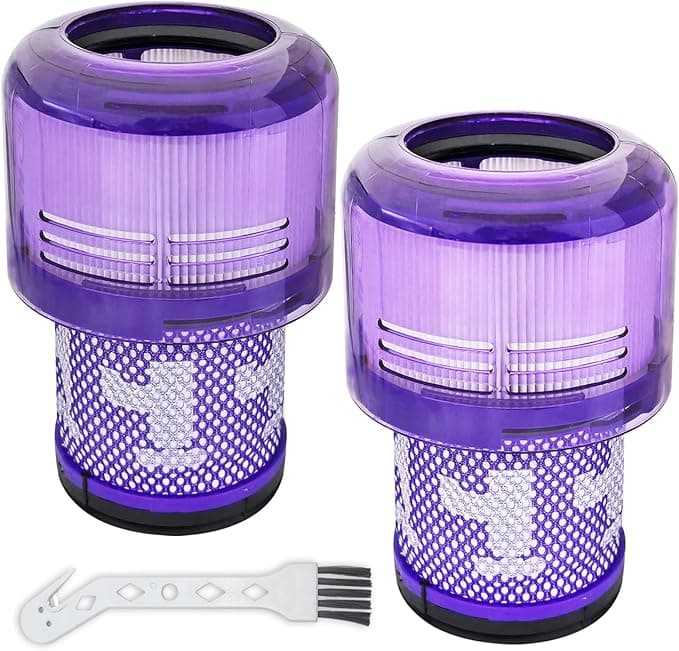
This was my real fear. Not performance, not filtration percentages. Fit. A filter that sits a millimeter proud, or seats loose, lets dirty air sneak past the media and straight into the motor — and on a V15 that's the whole ballgame. So the first thing I did when this one arrived was dry-fit it against the old Dyson part, side by side on the counter.
Close. Really close. The purple cap diameter matched, the foam depth was within a hair, and when I dropped it into the housing and twisted, I got the click. That little seated click is what you're listening for. It locked in like the original did. If I'm nitpicking — and I am — the frame on the compatible one felt a touch softer to the squeeze, slightly more give in the plastic than Dyson's. Did it affect the seal? Five months in, no. It seats flush and it stays put. But I won't pretend the materials feel identical, because they don't.
The swap itself is nothing, by the way. You pop the bin off, twist the old filter out of the top of the cyclone, and the new one goes in the same way. If you've never done it: rinse the filter under cold water until it runs clear, no soap, then — and this is the part people skip — let it dry completely. I mean a full 24 hours, longer if your place is humid. Putting a damp filter back in is how you cook the motor and get that wet-dog smell blowing around your living room. The compatible one rinses and dries exactly like the Dyson; same washable foam, same routine.
What it actually does
Suction came back the day I installed it. Not "kind of." All the way back — the V15 was yanking the bristle bar flat into the rug again, the bin filling like it used to. That faded whine was gone. Five months of weekly vacuuming over a dog who sheds like it's his job, and I've washed this filter maybe four times. Each rinse, suction restores to basically full. The claim on these is capturing 99.9% of dust and allergens, and look, I can't run a particle lab in my kitchen — but I can tell you my allergy mornings haven't gotten worse, the exhaust doesn't smell dusty, and nothing fine is blowing back out the back. For a foam-and-pleat filter, that's the job, and it's doing it.
Where's it a touch behind OEM? Honestly, marginal. If I run them back to back the Dyson foam feels a hair denser, and I'd believe it holds up slightly longer over years. But that's a difference I'm inferring more than feeling.
The downside I promised you
Two things, and I'll be straight about both. One: the first three days, there was a faint plastic smell on the exhaust. Not chemical, not alarming — that new-foam off-gas you get with anything molded. It aired out completely by day four and never came back. Two: the packaging is cheap. A thin poly bag, no fancy box, and mine arrived with a slight crease in the cap that I had to gently flex back into round. Cosmetic. It didn't affect the seat. But if you're someone who needs the unboxing to feel premium, this isn't that, and the price tells you why.
So who should skip it
If your V15 is still under warranty and you're the type who worries that any third-party part voids coverage — buy the Dyson and sleep easy. Same if you genuinely can't be bothered to dry-fit and check the seal yourself; with OEM you don't think about it. That peace is worth forty bucks to some people, and that's a fair trade.
For everyone else? I was the skeptic. I went in assuming twenty dollars meant twenty dollars of garbage, and I came out wrong. The fit is right, the suction's back, the one real downside aired out in three days. A clogged filter chokes the motor and overheats it — that's the actual risk you're managing here — and this thing manages it just as well as the part costing twice as much. I've already ordered a second one to keep on the shelf. When you can rinse and reuse a washable filter, the math gets even sillier: I'm spending less than half, doing the identical job, on a part I now trust. I'd buy it again. I have.