Troubleshooting & Analysis
Sixty-five dollars. For a piece of foam and mesh.
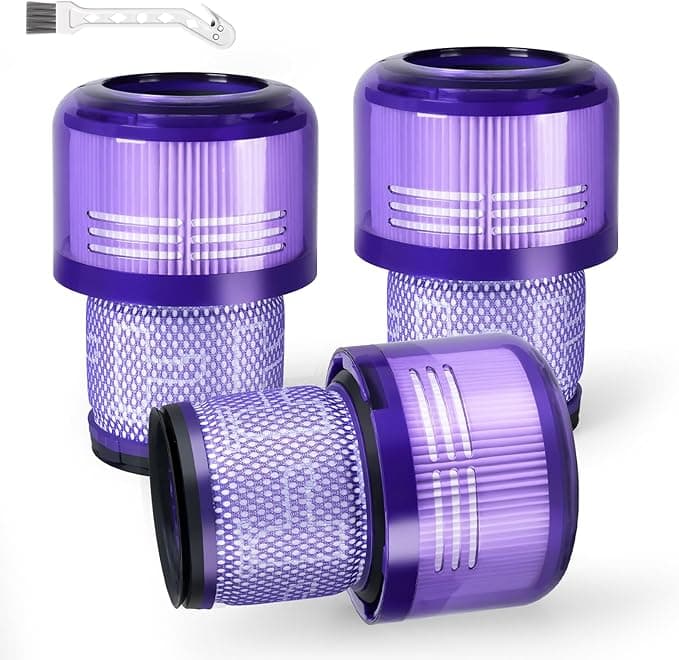
That's what Dyson wanted for a replacement filter for my V15 when the suction started fading last spring. Sixty-five bucks, plus shipping, for a part that is — let's be real — a pleated cylinder and a foam pre-filter. I stood there with the cart open on my phone and just couldn't do it. The vacuum itself already cost me more than my first car's brake job. So I went looking, found a compatible washable filter for $14.99, ordered two, and figured I'd either save fifty dollars or learn an expensive lesson.
I've now run one of those $15 filters in my daily V15 for a little over five months. Here's the honest rundown.
The math that made me click "buy"
The Dyson-branded filter runs $55–65 depending on where you catch it. The compatible one I bought was $14.99 for a single, or about $24 for a two-pack. If you're the kind of person who actually swaps a vacuum filter on schedule — and you should, because a clogged one is what kills these machines — that price gap compounds fast. Say you replace once a year because you've been rinsing and the foam finally wears out. Over four years that's roughly $240 in OEM filters versus about $48 in compatibles. That's not nothing. That's a decent pair of shoes.
And here's the part Dyson doesn't put on the box: the V15 filter is washable. You're supposed to rinse it under cold water and let it dry. So you're really only buying a new one when the old one is physically falling apart or you forgot to dry it fully and it got that wet-dog mildew smell. Which, yes, happened to me once. More on that.
Does it actually seat right?
This was my real fear. Dyson tolerances are tight, and a filter that sits a half-millimeter proud can throw the whole seal off. I popped the old one out — twist counterclockwise on the V15, lift it free — and dropped the compatible in. It clicked. Same satisfying quarter-turn lock, same flush sit against the body. No gap I could feel with a fingernail around the rim.
Honestly, the fit was better than I expected. Not OEM-perfect — the plastic collar on mine is a touch thinner than Dyson's, and the molding seam is a little rougher to the touch. But functionally? It locks, it seals, the machine doesn't throw a filter-fault on the LCD screen. That screen is the tell, by the way. The V15 will flat-out warn you if airflow's wrong. Mine's never complained about the cheap filter.
How it cleans, five months in
Suction is the whole ballgame, and I genuinely can't feel a difference on the floorhead. I ran it across the same stretch of low-pile rug I always test on — the spot by the couch where the dog sheds — and the particle counter on the V15 (the little laser thing that's actually useful) climbed the same way it did with the Dyson filter. Fine dust, the stuff you can't see, it's pulling it.
Where I'll be straight with you: I think the OEM pleated media is a hair denser. After a long session emptying a full bin, the compatible filter loads up a touch faster and needs a rinse sooner — maybe every five or six weeks for me versus every eight on the genuine one. Not a dealbreaker. Just a thing I noticed. If you're vacuuming a hair-salon's worth of debris daily, the OEM might hold its airflow a little longer between washes.
The downside I promised you
Two, actually. First: out of the bag, it had that faint new-plastic smell for the first three days of use. Warm motor air pushing through fresh foam. It faded completely by day four, but the first time I ran it I definitely caught it. If you're scent-sensitive, run it by an open window the first couple of times.
Second, and this is on me, not the filter: I rinsed it, got impatient, and reinstalled it not-quite-dry. That's how I got the mildew funk, and it's also genuinely risky — a damp filter near a motor is asking for trouble. The fix was easy (pull it, let it fully air-dry 24 hours, smell gone), but the lesson stands. Dry it completely. The instructions say so for a reason. This is true of the OEM filter too, so it's not a knock on the cheap one — just don't be me.
Why a dead filter actually matters
Quick reality check, because people skip filter maintenance entirely and then wonder why their $700 vacuum sounds like a hairdryer dying. A saturated, clogged filter chokes airflow. The motor then works harder to pull air it can't get, runs hotter, and on these high-RPM Dyson motors that heat is what eventually cooks them. You also start blowing fine dust back into the room you just cleaned, which defeats the entire point. A $15 filter you swap or rinse on time is cheap insurance against a motor you can't replace.
So who should buy what?
If you're still inside your Dyson warranty and you're the type who'd panic about a third-party part affecting coverage, buy the OEM and don't think about it. Same if you run a cleaning business and your vacuum eats abuse all day — the slightly denser OEM media earns its keep there.
For everyone else — regular home, normal mess, a dog, a kid, the usual — I grab the compatible one. I've now bought it twice. It seats right, it pulls the dust my V15's own sensor confirms it's pulling, and it does that for a quarter of the price. The plastic smells for a few days and it wants a rinse a little sooner. That's the whole list of complaints. For fifty dollars back in my pocket, doing the same job in my actual living room, that's a trade I'll keep making.