Troubleshooting & Analysis
The click is what sold me
You know the sound a Dyson filter makes when it seats right? That little quarter-turn snap, the one that tells you it's actually locked and not just sitting in the well pretending. The first compatible filter I bought for my V15 made that exact click. I'll be honest — I was expecting it not to. I figured a $14 washable filter would slide in loose, rattle a little, and I'd spend the next six months wondering if I'd voided something. It didn't. It snapped in like it belonged there.
That's where my V15 filter experiment started, and I've now run aftermarket filters in two of these vacuums for the better part of a year. Here's the honest rundown.
The price gap is the whole reason you're reading this
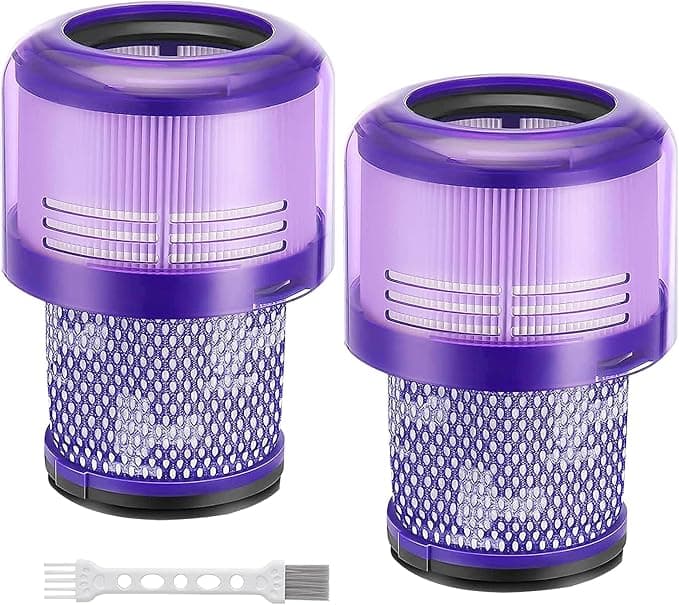
A genuine Dyson V15 filter runs you somewhere in the $25–30 range when you buy it straight from Dyson, and creeps higher if you're stuck buying it through a third-party storefront at a markup. The compatible washable units I've been using sit closer to $12–15, and they usually ship two to a pack. So you're looking at maybe $7 per filter versus close to $30.
Now, you don't replace a washable filter often — the whole point is you rinse it. Dyson tells you to wash it about once a month and the filter itself lasts a good long while. So this isn't a "save $200 a year" situation, not really. It's more like: when the old one finally gets ragged, brittle, or won't come clean anymore, you're replacing it for a quarter of the price. Over the life of the vacuum that adds up, and honestly it just removes the flinch. I used to baby my OEM filter because replacing it stung. With the cheap two-pack sitting in a drawer, I actually wash mine on schedule now instead of putting it off.
Does it fit, really?
This is the part everyone's nervous about, so let me be specific. The V15 filter is the purple-ish cylindrical unit that sits up top, behind the bin. Process is dead simple: pop the bin off, lift the old filter out — it just pulls straight up — and drop the new one in with that quarter turn.
The compatible one seated correctly. The pleated mesh lined up, the rubber gasket at the base sat flush, and that's the part that matters most, because a bad gasket is where unfiltered air sneaks past. I checked it under a lamp. No gap.
One honest caveat: the molded frame on the aftermarket one felt a hair less precise than Dyson's. Not loose — it locks — but the plastic has a slightly cheaper finish, a touch more flex when you squeeze it. Did it affect anything in use? No. But if you're the type who notices these things, you'll notice it for about four seconds and then forget about it.
Suction and the smell I wasn't warned about
Suction is the thing you're buying a vacuum for, and the V15's whole identity is that screaming high-RPM motor. A clogged or saturated filter chokes it — you feel the power sag, and on a bad day the unit gets hot and starts cutting out to protect the motor. So the filter genuinely matters here. It's not a decorative part.
With a clean compatible filter installed, suction was indistinguishable from OEM to me. I ran the laser head across the same stretch of hardwood and low-pile rug I always test on, same battery mode, and it pulled the same dust line. The piezo sensor still counted particles like normal. After four months of weekly use and monthly rinses, it held up — no collapse in the pleats, no tearing where the gasket meets the frame.
Here's the downside I actually have to report, though: the smell. For the first two or three days the new filter put off a faint plastic-and-foam odor when the motor warmed up. Not strong, not chemical-burning, just... new. Like a cheap pool float. It faded completely by day four and never came back. If you're sensitive to that, run the vacuum for ten minutes by an open window the first day and you'll skip the worst of it.
Where I'd tell you to buy OEM instead
I'm not going to pretend the aftermarket filter is the right call for everyone. If your V15 is still inside its warranty window and you're the cautious type, buy Dyson's — not because the compatible one will hurt the machine (mine hasn't, and the gasket seals fine), but because some people sleep better not giving a warranty department any excuse. That's a real reason and I respect it.
And if you've had a bad experience with a no-name brand that arrived warped or with a gasket that didn't sit — return it, don't force it. A filter that doesn't seal is worse than no filter, because dust blows straight back into your room and the motor runs hot. Fit is non-negotiable. The good news is you can feel a bad fit instantly: no click, visible gap, wobble. Mine had none of those.
So would I buy it again?
I have, twice. Look — the V15 is a $700 machine and there's a real instinct to feed it only genuine parts. I get it. But after a year of running washable compatibles, rinsing them on schedule, and watching the suction stay exactly where it should, I can't justify paying triple for the same job. The smell goes away in three days. The frame's a little cheaper and you'll never think about it again. The thing clicks in, seals tight, and keeps that motor breathing.
For the price of one OEM filter you get a two-pack that'll outlast your patience. That's the math, and that's why there's a compatible filter in my V15 right now.