Troubleshooting & Analysis
The smell hit me before I even got it seated
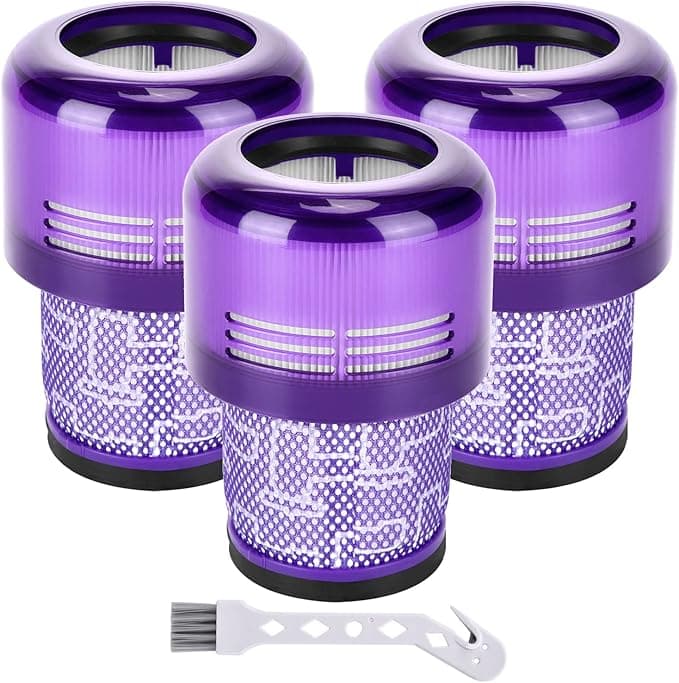
First thing I noticed pulling the compatible filter out of its little plastic sleeve — that faint chemical-plastic smell. Not strong. Kind of like a new shower curtain. I almost sent it back right there, because my old genuine Dyson filter never smelled like anything. But I'd already cracked the package, so I twisted it into my V11 and listened for the click. And it clicked. That satisfying little seat where the purple cap lines up with the body and locks. Same click as the real one. That click is honestly half of what you're paying for with a Dyson — the feeling it fits.
So I ran it. Four months now in my main-floor V11 that eats dog hair for a living. Here's the honest report.
The price gap is the whole reason we're here
A genuine Dyson V11 filter runs me $40 to $55 depending on where I catch it, and Dyson would love for me to swap it on a schedule. This compatible one — the Filter R replacement — I paid around $18 for a two-pack. Do that math out. If you're a one-filter-a-year household, you're looking at maybe forty bucks saved per swap. If you're like me and you run the thing hard enough to rinse and rotate filters, that two-pack basically pays for itself the first month versus buying a single OEM.
And it's washable, which is the part people forget. You're not really buying a consumable here. You're buying a part you rinse under the tap, dry, and reuse for months. The savings compound the longer you own it.
Does it actually fit, or is "compatible" doing heavy lifting?
This is the question I'd want answered, so let me be specific. The install is the same three-second move as the genuine one: I pop the dust bin off, pull the old filter straight up out of the top, drop this one in, twist till it clicks. No adapter, no shimming, no forcing. It dropped into the V11 housing on the first try.
Now — full honesty — the frame is a hair looser than the Dyson original. When I wiggle it side to side before locking, there's a touch more play than I remember from the genuine part. Once it's twisted home it doesn't move, and I've had zero rattle running it, but a perfectionist would feel that little bit of slop on the way in and wonder. I wondered too. Four months later it's still locked tight, so I stopped wondering.
The rinse-and-dry part people get wrong
Couple of practical notes since this is washable. You rinse it under cold water only, no soap, and you squeeze — don't twist or wring the pleats. Then here's the one that bites people: you let it dry completely. Like 24 hours, fully. I made the mistake of reinstalling one a little damp once and the suction was garbage until it finished drying out inside the machine. That's not a filter defect, that's a wet filter doing what wet filters do. Dry it all the way and you're fine.
How it actually performs against the real thing
Suction, day to day, I genuinely can't tell the difference. It claims to grab 99.9% of dust and allergens and I can't run a lab in my living room, but the practical test — does my floor look done, does the bin fill the way it used to — passes. Carpet, hardwood, the dusty corner behind the couch. It picks up like the V11 should.
Where it's a touch behind: I think the genuine filter holds its peak suction a little longer between rinses. With this one I notice the pull starting to soften maybe a week sooner than the Dyson did, which just means I rinse it a little more often. Not a dealbreaker — it's washable, rinsing is free — but if you're someone who never wants to think about it, that's the small tax.
The other real downside, and I said it up top: the packaging is cheap and the first few days carry that plastic smell. By day three running it, the smell was gone. Hasn't come back. But for the first couple uses I could catch a whiff of it in the exhaust, and if you've got a sensitive nose you'll notice.
Why you don't want to ignore this part
Quick word on why any of this matters, because it's not just about a clean floor. A clogged or saturated filter in a V11 chokes the airflow, and that cordless motor spins fast — starve it of air and it runs hot and works harder than it should. You'll feel suction drop off and, worse, dust starts blowing back out instead of staying trapped. That's the actual risk of running a dead filter too long: you're recirculating the stuff you just vacuumed and cooking the motor doing it. Which is the real argument for a cheap washable spare — there's no excuse to limp along on a clogged one when a fresh rinsed filter costs you nothing to swap in.
So who should buy what
If your V11 is still under warranty and you're the type who'd blame a third-party part for any hiccup down the road — buy the genuine Dyson and sleep easy. Same if a faint break-in smell would genuinely bother you, or you just want zero variables. That's a legit choice and I won't talk you out of it.
But me? I've now bought these twice. The fit clicks, the suction does the job, it rinses clean and goes back in, and it costs less than half of what Dyson wants. The looser frame and the three-day smell are real, and I told you about them — and I still reach for this one every time. For the money it's doing the same work in my machine, and that's the whole point.