Troubleshooting & Analysis
The smell hit before the suction died
I knew something was wrong with my V11 before I knew what. It was the smell — this warm, dusty, slightly-burnt-electronics smell coming off the back of the machine while I was doing the stairs. Then halfway up I noticed the head wasn't grabbing the dog hair anymore. It was just pushing it around. I pulled the trigger harder, like that ever helps, and the thing felt gutless. A $600 vacuum behaving like a $30 dustbuster.
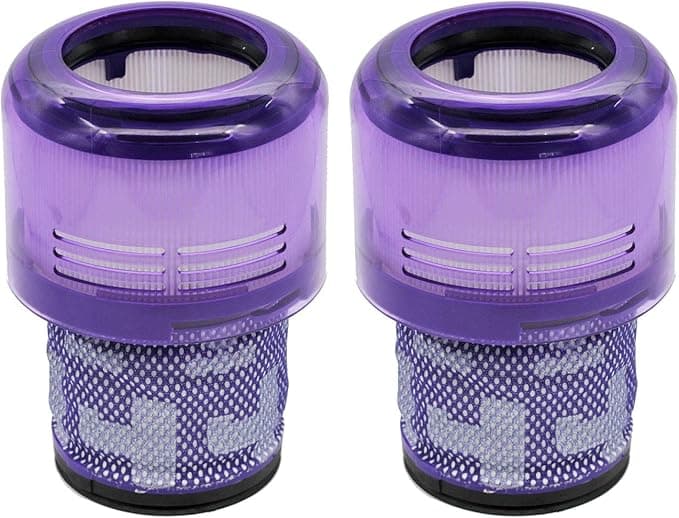
I popped the top, twisted out the filter, and — yeah. It was gray. Not dusty-gray, packed-gray, like felt that had given up. I'd been "meaning to rinse it" for about four months. That overheating smell? That's the motor working twice as hard to pull air through a wall of compressed dust. That's the part nobody tells you about until your machine starts cutting out mid-clean and you're googling "Dyson V11 weak suction" at 9pm.
So I had the choice everyone with a cordless Dyson eventually has. Buy Dyson's own replacement filter, or try one of the compatible ones for less than half the price. I'd already wasted one filter through neglect. I wasn't thrilled about spending OEM money to replace something I'd just killed through laziness. So I bought the compatible washable one to test it. Here's how that actually went.
The price gap is the whole reason you're reading this
Dyson's own V11 filter runs you somewhere in the $25–35 range depending on the day and whether they feel like bundling it. The compatible washable one I grabbed was right around twelve bucks. That's not a rounding error. That's the difference between "ugh, fine" and "wait, why is the genuine one triple the price for a piece of pleated foam and mesh?"
And here's the part that matters over time: both of these are washable. So you're not buying one a month. You rinse it, dry it, reuse it. Dyson says rinse monthly — I do it more like every six weeks because I'm human. Realistically a washable filter lasts a year, year and a half before the pleats start looking tired and it stops drying back to full airflow. So the real math is one filter a year. Paying $30 versus $12 for that one annual filter still isn't nothing, but the bigger win is just having a cheap spare sitting in the drawer so you're never running the machine on a wet or dead one.
Does it actually seat right?
This was my real worry. Compatible Dyson parts have a reputation — sometimes the fit is a hair off and you get that sloppy wobble or, worse, an air gap that lets unfiltered dust sneak past. So I paid attention installing it.
The routine's the same as stock: pull the bin off, twist the old filter out of the top of the cyclone, drop the new one in, twist to lock. The compatible one seated with a proper click. Not loose. The purple cap lined up flush with the body — no lip sticking out, no gap you could slide a fingernail into. I gave it a wiggle and it didn't budge. Honestly it fit tighter than I expected for the price.
One thing — and do not skip this with any washable filter, OEM or not. After you rinse it, it has to dry completely. Cold water rinse until it runs clear, squeeze, then 24 hours upright. I got impatient once and ran a slightly damp one and the suction was garbage until it finished drying inside the machine. That's not a filter problem, that's a me problem, but it'll make you think you bought a dud when you didn't.
The honest performance read
Suction came right back. Full trigger pull, the head grabbing hair off the rug again, that satisfying high-pitched whine of the motor actually moving air. On bare floors and the usual dust-and-pet-hair routine I genuinely cannot tell it apart from the Dyson filter. It captures the fine stuff — they rate it at 99.9% of dust and allergens and I'll buy that, because my allergy nose is a pretty good sensor and nothing's blowing back at me out of the exhaust.
Where's it a touch behind? Two small things. The foam feels very slightly less dense than Dyson's when you squeeze them side by side, and I'd bet over a couple years it tires out a little sooner — which, at this price, who cares, buy another. And it took about three days of use to lose a faint plastic-y smell out of the box. Not chemical-bad, just new-plastic. Gone by day three and never came back.
The actual downside
The packaging is cheap and a little embarrassing. Thin plastic sleeve, a sticker, that's it. No box. It feels like you bought something off a folding table. It does not affect the filter at all, but if you're someone who needs the unboxing to feel premium, this isn't that. You're paying for the part, not the presentation.
The other thing I'll flag honestly: there are bad compatible filters out there. The fit being right is the whole ballgame. The one I'm describing seated correctly — but this is a category where you want the listing with real reviews and people confirming it locks in, not the cheapest no-name with four ratings.
Who should buy the genuine one
If your V11 is still under warranty and you're the type who'd blame any future motor hiccup on a third-party part and lose sleep over it — buy Dyson's. Genuinely. The peace it buys you is worth thirty bucks to some people, and that's a fair trade.
For everyone else? I've now run this compatible washable filter through a full cleaning rotation, rinsed it a few times, and my V11 pulls exactly like it did the day I bought it. It fit, it sealed, it caught the dust, and it cost me a third of the price. I keep a second one in the drawer so I'm never tempted to run a damp one again. Look — I killed my first filter through neglect, and replacing it shouldn't feel like a punishment. For twelve dollars doing the same job, I'd buy it again. I already did.