Troubleshooting & Analysis
Standing in the hardware aisle doing dumb math
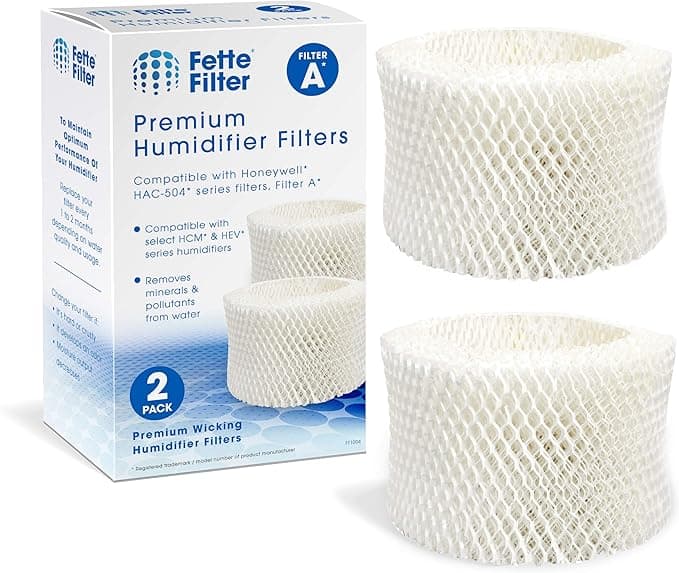
I had the Honeywell wick in one hand and my phone in the other, and I was doing the kind of math you do when you feel slightly ripped off. The genuine Honeywell HAC-504 — the Filter C / Filter W / Filter H wick, depending on which box your humidifier shipped with — runs me around $22 each at the store near me, and my unit eats one roughly every season. The compatible three-pack I'd pulled up online worked out to about $9 a filter. Same wick shape. Same job: soak up the tank water, wick it up, let the fan blow dry winter air through wet paper so my sinuses stop staging a revolt every January.
So that's a $13 gap per filter, and across a year of running this thing hard, the difference adds up to real money — enough that I stopped pretending I didn't care and actually bought the cheap ones to find out. I've now run compatible HAC-504 wicks through two full heating seasons. Here's the honest version.
The fit, and the small fib I told myself
First thing I'll say: it fits. The HAC-504 is one of those tall paper-and-mesh wicks that drops into the filter frame, and the compatible one I got dropped into the same slot the OEM did without me forcing anything. The replacement itself is dead simple — you turn the humidifier off and unplug it (do this, the water and the electric base are right next to each other), pop the top housing off, lift the old saturated wick out of its frame, and seat the new one in the same orientation. Two minutes, maybe.
But I'm not going to tell you it was identical out of the box, because it wasn't. The compatible wick's frame was a hair looser in the housing than the Honeywell-branded one. Not loose enough to flop around or sit crooked — it still seated and the lid closed flush — but if you wiggle the housing you can feel a little more play than the OEM gives you. After about a day of running, the paper swelled with moisture the way these wicks do and snugged itself in, and I stopped noticing. Still. The first time I felt that wiggle I thought, "great, I bought junk." I hadn't. But the cheaper tolerances are real and you'll feel them on day one.
How it actually performs
This is the part that matters, and it's where the compatible wick earned its keep. I keep a cheap hygrometer across the room, and with the OEM Honeywell wick my bedroom would settle into the mid-40s percent humidity overnight on the medium setting. With the compatible wick? Mid-40s. I genuinely could not tell a difference in output. The fan pushed the same damp air, the tank drained at about the same rate, and my morning sinus situation was the same flavor of "fine."
The wicking material itself looks and feels like the same stiff honeycomb paper. It pulls water up the full height of the wick — I checked, because a bad wick will leave the top half bone dry and you lose half your evaporative surface. This one wetted all the way up within an hour of the first fill. That's the whole ballgame for a humidifier filter, and it passed.
Where it's a touch behind
Two things, and I want to be straight about both because this is where the price shows.
One: lifespan. The genuine Honeywell wick, in my hard water, would go a solid two to three months before it stiffened up with mineral crust and started smelling a little swampy. The compatible wick felt like it crusted up maybe a couple weeks sooner. Not dramatically — but if you've got hard water like mine, the mineral buildup that turns these wicks into crunchy gray bricks seems to win a little faster on the cheaper paper. Given that I'm paying less than half price, I'll happily swap a touch more often and still come out way ahead. But it's a real difference, not a marketing footnote.
Two: the packaging is cheap and there's a faint papery-plastic smell the first day. The OEM comes in a tidy printed box; my compatible three-pack came shrink-wrapped in a flimsier sleeve, and the first few hours of running it there was a mild "new filter" smell — not chemical, not alarming, just the smell of fresh treated paper getting wet for the first time. Gone by the next morning. If you're scent-sensitive, run it a few hours before bed the first night.
Why you can't just let the old one ride
Quick reality check, because I learned this the lazy way: a humidifier wick is not a "replace it whenever" part. When it stiffens and clogs with minerals, it stops wicking water efficiently, so your output drops and you start chasing humidity that never comes. Worse, a permanently damp, neglected wick is exactly the kind of place mildew likes to set up shop, and then you're blowing that into the room you sleep in. And if your water's hard, a dying wick is also when you start seeing that fine white mineral dust settle on the nightstand. None of that is the filter brand's fault — OEM or compatible, a wick you ignore for six months goes bad the same way. The fix is the same too: swap it on schedule, and rinse the tank now and then. The compatible wick just makes swapping on schedule a lot less painful for the wallet.
Who should skip it — and what I actually do
If you're still inside a warranty window where Honeywell could plausibly blame a third-party wick for a problem, or you've got very soft water and you're the type who runs a single wick for its absolute maximum life and wants every last week out of it, the genuine HAC-504 is a defensible buy. There's nothing wrong with the real one. It's just expensive for what it is.
For everyone else — meaning most of us with normal-to-hard tap water who just want the room to stop feeling like the Sahara — the compatible HAC-504 does the same job. I ran it two seasons, it held humidity exactly like the OEM, it had a slightly looser frame and a slightly shorter life and a cheap wrapper, and it cost me roughly $9 instead of $22. I knew all its flaws going in and I still reordered the compatible three-pack when this winter started. That's the most honest endorsement I've got: I tested it suspicious, found the seams, and bought it again anyway.