Troubleshooting & Analysis
I didn't believe a $20 head could be fine either
Look, I'll be straight with you. When my Braun Series 7 started tugging — that little pinch right under the jaw where the hair grows sideways — I did what everybody does. I typed the model number into the search bar, saw Braun wanted somewhere north of $45 for a genuine replacement cassette, and then saw a compatible one sitting right under it for about $20. And I closed the tab.
Because come on. Twenty bucks for the thing that scrapes a blade across my throat every morning? That's the part I'm supposed to trust the foil-and-cutter combo on? I figured it'd be stamped out of softer steel, it'd dull in three weeks, and I'd be back to buying the real one anyway, having wasted the twenty. So I bought the OEM that time. Paid full price. Felt responsible about it.
Then about eight months later the same tugging came back, and I was tired, and the compatible one was still sitting there at $20. So I caved. I bought it half to prove myself right — to confirm the cheap one was junk so I could stop being tempted. That's the honest reason I have anything to tell you.
What you're actually choosing between
Here's the math that made me cave, laid out plain. A genuine Braun Series 7 head — the 73S or the 70S depending on your exact unit — runs roughly $45 to $50 most places I've looked. The compatible cassette I bought was $20. Braun says swap the head about once a year if you shave daily. So over the life of the shaver, that's not a one-time $25 gap. That's $25 every single year you keep the machine. Three years in, you've handed Braun an extra $75 for the privilege of the logo on the box.
And the thing people forget: you are not buying a new shaver here. The motor in your Series 7 is fine. The battery's fine. The only thing that wears out is the cutting surface — the foil that thins and the blade underneath that goes dull and starts pulling hair instead of slicing it clean. That pulling is what gives you the razor burn and the red neck. Replace the head, the whole machine is basically new again. So the real comparison isn't "cheap part vs. good part." It's "spend $20 vs. spend $200 on a new shaver you don't need."
Putting it in — and the first shave
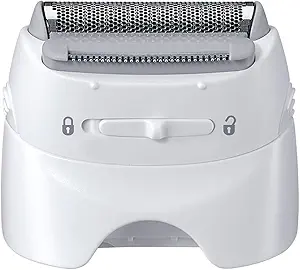
Install is genuinely nothing. You press the two release buttons on the sides, the old head pops off, and the new cassette snaps straight down into place. You feel it click. I put a single drop of light oil on the foil after — habit from years of doing this — and let it sit overnight. If you've ever changed a Series 7 head before, your hands already know how.
The fit on mine was good. Snapped in square, no rocking, no gap on the sides where dust could get in. The little tabs lined up with the housing exactly like the genuine one. If you've read reviews where someone says the aftermarket head wobbled — I didn't get that. It seated as tight as the Braun-branded one did.
First shave, the day I'd actually expected to be smug about being right? It was fine. More than fine. The tugging was gone — completely gone — which honestly it should be, because any fresh blade beats a worn one. Close shave, no nicks, no missed patches under the jaw. I went over it twice the first morning just looking for a reason to be disappointed and didn't find one.
The downsides — and there are real ones
I'm not going to pretend this is the genuine part with a cheaper sticker. It isn't, and you should know where it gives a little.
The plastic frame around the cassette is the tell. It's a touch lighter, a little more hollow-feeling than Braun's, and the finish on it isn't as crisp — the molding seam is slightly more visible. It doesn't affect the shave at all, but if you're the kind of person who notices that stuff, you'll notice it. The packaging is also cheap. Thin cardboard, a sticker that was a hair crooked. Whatever — I threw the box away in ten seconds, but it's the kind of thing that makes you second-guess at first.
The bigger honest one: longevity. The OEM head I'd been running lasted me a solid year before the pulling came back. This compatible one — I've been on it about five months now, daily shaves, and it's still cutting clean, but I'd genuinely bet it gives out a month or two sooner than the genuine one did. Call it ten months instead of twelve. So the steel probably is a little softer, like I'd feared. The difference is, at $20 a pop, I do not care. Even if I replace it slightly more often, I'm still miles ahead of paying $45+ for the branded one. The fear was that it'd die in three weeks. It didn't. It's just a normal blade that wears at a normal rate, maybe a smidge faster.
One more usage detail worth saying: there was the faintest factory smell on it out of the package — a light machine-oil-and-plastic thing — that was gone after the first rinse and first shave. Didn't transfer to my skin, didn't smell on day two. Worth a quick rinse before you mount it, but nothing alarming.
Who should still buy the genuine Braun
If you've got sensitive skin that reacts to everything, or you're the type who wants the absolute longest service life out of one cassette and the every-ten-months swap would annoy you more than the price — buy the OEM. Some people just want the part Braun made, full stop, and there's nothing wrong with that. If a slightly looser-feeling plastic frame would bug you every morning, spend the extra and don't think about it.
But me? I run a Series 7 in my bathroom, I shave every day, and the compatible head gave me a clean, no-tug shave for a fraction of what the branded one costs — and I went in actively rooting for it to fail. It didn't. For $20 doing the same job the $45 part does, I'd buy it again. And I have — there's a second one already in the drawer waiting for when this one finally wears out.