
Troubleshooting & Analysis
Problem Identification: Is Your Dyson Outsize Losing Suction Power?
There’s nothing more frustrating than pulling out your trusty Dyson Outsize vacuum cleaner, only to find that it’s lost its powerful suction. You might notice blinking lights indicating a problem, or worse, an unpleasant odor wafting through the air as you vacuum. If you've ever asked yourself, "Why does my vacuum smell like my dog?" you're not alone. These issues are not only annoying but can significantly impact the effectiveness of your cleaning routine.
As a pet owner, the last thing you want is to smell your furry friend’s scent lingering in the air, especially when you're trying to maintain a fresh and clean home. Let's dive into the common symptoms of a malfunctioning Dyson Outsize and how to troubleshoot them.
Troubleshooting Guide: Fixing Common Dyson Outsize Issues
Step 1: Check for Clogs
One of the primary reasons for decreased suction is a clog somewhere in the vacuum. Start by inspecting the following:
- Cleaner Head: Remove any hair or debris caught in the brush bar.
- Hoses: Check for blockages in the hoses by detaching them and looking inside.
- Dust Canister: Empty the canister regularly to ensure optimal airflow.
Step 2: Clean the Filters
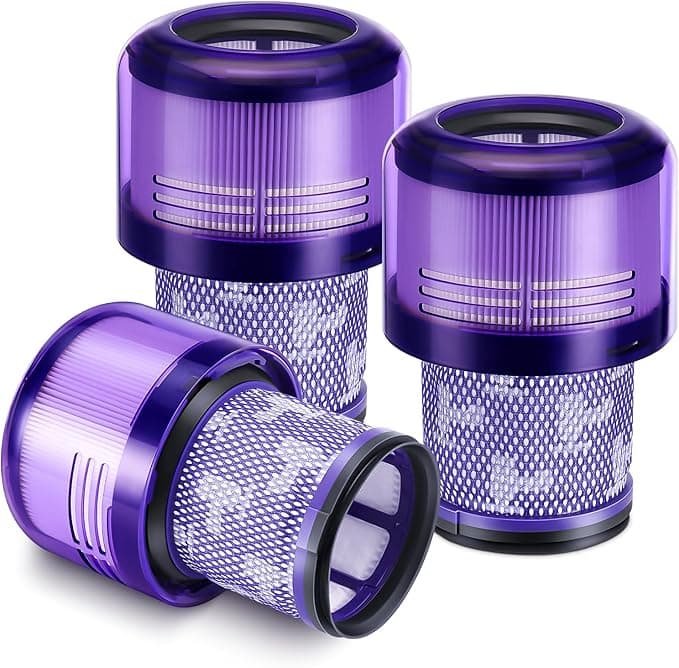
Dyson vacuums come equipped with a motor filter that can get clogged with dirt and debris, impacting suction power. To clean the filter:
- Remove the filter from the vacuum.
- Rinse it under cold water until the water runs clear.
- Let it dry for at least 24 hours before reinserting it.
Step 3: Reset the Vacuum
If the vacuum continues to display blinking lights or error codes, a reset might be necessary:
- Turn off the vacuum.
- Disconnect it from the charger and leave it unplugged for 10 seconds.
- Reconnect and turn it back on.
Cost Analysis: Investing in Replacement Parts
When it comes to maintaining your Dyson Outsize, you might wonder whether to wash your filters or invest in replacement parts. Here’s a simple cost comparison of using original Dyson parts versus compatible alternatives:
| Part Type | Original Dyson Part Cost (1 Year) | Compatible Part Cost (1 Year) | Estimated Savings |
|---|---|---|---|
| Motor Filter | $50 | $25 | $25 |
| Pre-Filter | $30 | $15 | $15 |
| Total Cost | $80 | $40 | $40 |
As you can see, opting for compatible parts can save you a significant amount of money over the course of a year, all while maintaining the performance of your vacuum.
Installation Pro-Tips: Getting it Right
Installing replacement parts in your Dyson Outsize is not just about plugging them in. Here are some pro-tips to ensure a seamless installation:
- Motor Filter: After cleaning, ensure the filter is fully dry before reinserting it. Insert it until you hear a snap to confirm it's locked in place.
- Pre-Filter: If replacing, align the grooves carefully and push until secure.
- Regular Maintenance: Schedule a monthly maintenance check to prevent future issues. A simple rinse of filters can go a long way!
FAQ Section
Will using compatible parts void my warranty?
No, using compatible parts generally does not void your warranty, as long as they meet the manufacturer's specifications. However, always check the warranty policy to ensure compliance.
How long do replacement filters last?
Typically, replacement filters can last up to 6 months with regular use, but this can vary based on the amount of dust and pet hair in your home. Regular cleaning can extend their lifespan.
What if the vacuum odor persists after replacing parts?
If you still notice odors after replacing the filters and cleaning the vacuum, it may be time to inspect the motor and internal components for any signs of wear or damage.
By understanding the common issues associated with your Dyson Outsize and knowing when to replace parts, you can maintain its powerful suction and keep your home smelling fresh. Investing in quality replacement parts not only improves performance but also saves you money in the long run. Happy cleaning!
